
Xilisoft AVI MPEG Converter Tutorial
| Xilisoft AVI MPEG Converter Tutorial - 2 | Referring  |
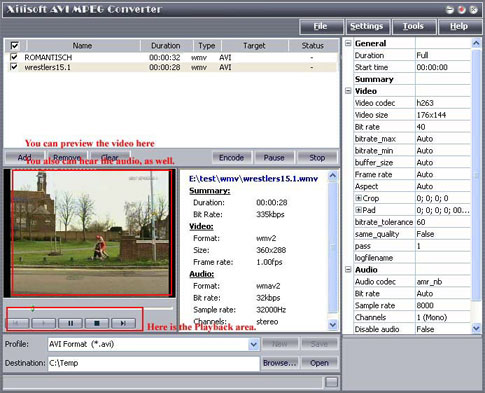
| 4. You can confirm if you have loaded the right file by previewing them. Please highlight the file that you want to preview, press "Play" button to preview it. Xilisoft AVI MPEG Converter supports playback function. | |
 |
|
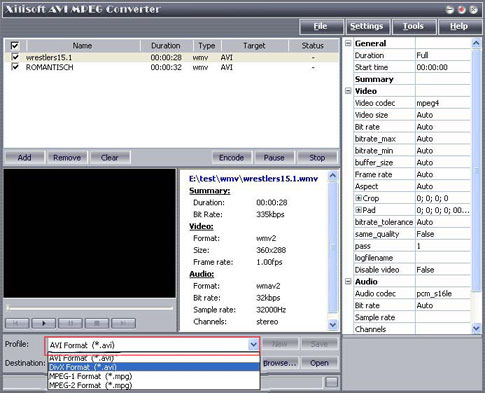
| 5. Select target file format that you want to output. Highlight your loaded file first and then select output format from "Profile" combo-box. You can select multi files and set output format simultaneously. | |
 |
|
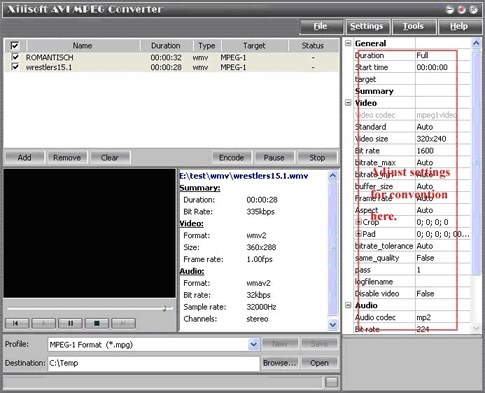
| 6. There are default settings which can be found in the right panel of the main window. It can be adjusted or changed manually according to your needs. If you don't know what the setting means, leave it as the default one. | |
 |
|
  Free Trial Free Trial Price: $25 Price: $25 |
|


