
Xilisoft DVD to PSP Converter Tutorial
| Xilisoft DVD to PSP Converter Tutorial - 2 | Referring  |
| How to transfer DVD to PSP? | |
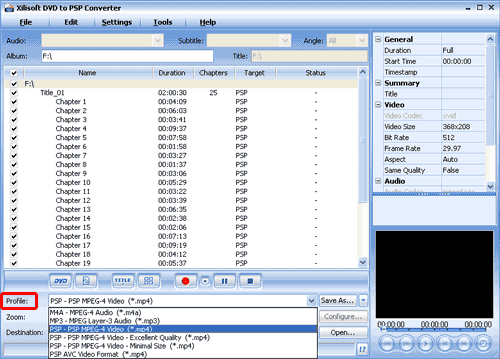
| 4. Highlight certain chapters you want to convert or just keep all chapters selected. Then set output format: Select the target output format in "Profile" combo-box on the interface. You can select different output formats for different files. | |
 |
|
| Tip: You will get a first-class output file if you select “Excellent Quality”, but the size of the file would be quite large in this way. According to the test, in excellent quality conversion, if your original video file is in 2 hours duration, the output file will be larger than 500 MB, which means it is beyond the capability of 512 MB memory stick. But with “Minimal Size” output, the output file will be about 220 MB, which means it is possible that you store two movies on your 512 MB memory disk. Generally speaking, I recommend the default setting “PSP-PSP MPEG-4 Video (*.mp4)”, which will produce medium quality in proper size. | |
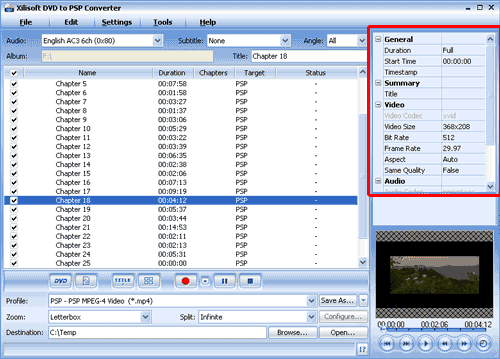
| 5. Set output mode: After selecting certain output format, the right panel will show general standard of the format. By clicking certain setting, you may specify it. Or just keep the default settings. | |
 |
|
| Tip: It supports clip or segment conversion. You can convert any clip or segment by setting the start point and duration at will. For example, you want to rip a clip from 00:03:20 to 00:08:00 please click "Start time" to set the starting time 00:03:20 and click "Duration" to specify the length 00:04:40. | |
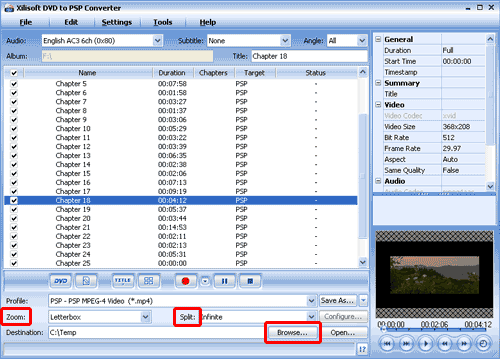
| 6. There are other options on the interface you can adjust. Or you can just keep the default settings: * In 'Zoom' section, you can find four options. 'Letterbox', 'medium', and 'pan scan' will convert 16:9 format to 4:3 format. The Full option does not correct the aspect ratio. If you have a 4:3 DVD, use the Full option. * In the 'Split' drop list, you may select the size of the volumes that you would like to generate. * Select the output folder by clicking the "Browse..." button or directly enter a path in "Destination" box. |
|
 |
|
  Free Trial Free Trial |
 Price: $29 Price: $29 |


