I redid my family room this year and recently made a plan for a home theater, and ended up going with the Apple TV. It's amazing to watch HD movies on my wide-screen TV through Apple TV. Now I wanna convert my library of HD videos recorded by my Sony DVR to Apple TV, these videos are MTS files. After googling "convert HD video to Apple TV", I find that a few video converters have added the support of HD videos. Finally I take Xilisoft Video Converter Ultimate as a trial due to its concise interface, reasonable price and high HD video support.
This video converter presets a lot of HD video converting solutions for Apple TV, PS3 and Xbox 360. For example, it offers six profiles at different resolutions for Apple TV: MPEG-4 480P with bit rate of 1500 kbps, MPEG-4 480P with bit rate of 800 kbps, MPEG-4 480P with bit rate of 1200 kbps, H264 480P with bit rate of 2000 kbps, H264 720P with bit rate of 2500 kbps, H264 320*240 with bit rate of 1200 kbps.
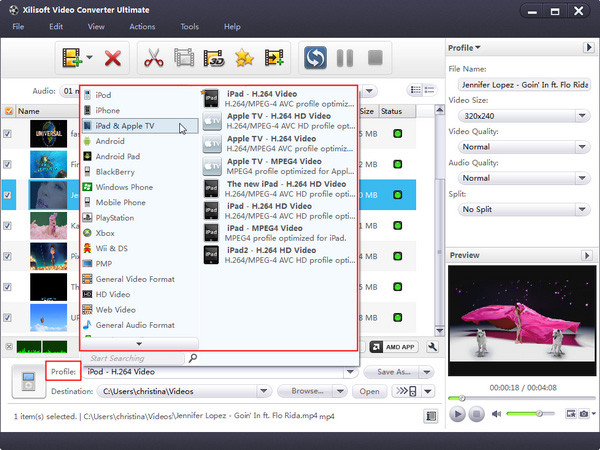
According to Apple TV's tech specs, Apple TV supports H.264 and MPEG-4 videos with different limits based on the encoder used. H.264 file can be up to 5 Mbps using the Progressive Main Profile (CAVLC) with AAC-LC audio up to 160 Kbps (maximum resolution: 1280 by 720 pixels at 24 fps, and 960 by 540 pixels at 30 fps). While MPEG-4 file can be up to 3 Mbps using the Simple Profile with AAC-LC audio up to 160 Kbps (maximum resolution: 720 by 432 pixels at 30 fps).
Obviously, H.264 file has higher flexibility in the way of data rate and generally looks better than MPEG-4 file. To reach the best effect, here I select the "Apple TV h264 720P (1280*720) (*.mp4)" profile as the target.
Now to its settings. This profile sets the video codec as h264, resolution as 1280*720 pixels (720P), bit rate as 2500 kbps, and frame rate as 23.97 fps. Anyway, the settings are all optimized, so actually you don't need to adjust the output settings.
Of course if you're not satisfied with the results, you can tweak the bit rate, or set the Quality to Higher or Highest. As to High-Definition source content - from an HD camcorder or TV capture box, you may want to turn to the Expert Settings for more control. Just remember that Apple TV HD files can only be 1280 by 720 pixels at 24 fps, or 960 by 540 pixels at 30fps, so if you use other video converter to convert HD video, you may need to adjust resolution and frame rate to get a playable file.
I also make some simple cutting and editing to my videos, and embed self-made subtitle files to some videos. It's really fun. These functions are indispensable to those who may want to scissor out some unwanted clips and create his/her own movie.
Finally I make a list of the supported popular HD video formats here for your reference: AVCHD Video (*.mts, *.m2ts), H.264/MPEG-4 AVC (*.mp4), MPEG2 HD Video (*.mpg; *.mpeg), MPEG-4 TS HD Video (*.ts), MPEG-2 TS HD Video (*.ts), Quick Time HD Video (*.mov), WMV HD Video (*.xwmv), Audio-Video Interleaved HD Video (*.avi), etc. Certainly, you’d better try it yourself to check whether it's for you or not.
You may also be interested in...
Knowledge Base
- Convert AVI to 3GP
- Put video on Zune
- Put videos on Zune
- Convert FLV videos to Zune video
- Download and convert YouTube videos
- Fast convert YouTube videos with YouTube converter
- Convert YouTube videos to Xbox
- Convert YouTube videos to iPod
- Convert YouTube to PSP videos
- Convert YouTube to other videos
- Convert YouTube to MOV
- Fast convert YouTube video to iPod
- Convert YouTube video to iPod
- Convert XviD to MP4
- Convert videos to Xbox
- Convert WMV to 3GP
- Convert WMA to MP3 with WMA MP3 Converter
- Convert MPEG to MP3
- Convert MP4 to MP3
- Convert video to GIF image files
- Convert M4V to AVI
- Convert videos on Mac
- Convert MPEG to MOV and MP4 on Mac
- Convert MP4 to MPEG on Mac
- Convert MP4 to AVI on Mac
- Convert FLV on Mac
- Fast convert XviD to MP4
- Convert XviD to AVI
- Convert WMV to AVI
- Convert videos to Zune
- Convert videos to Xbox
- Convert videos to PSP
- Convert SWF to MP4
- Convert RMVB to MP4
- Convert RMVB to AVI
- Convert RM to AVI
- Convert MP4 to SWF
- Convert MP4 to FLV
- Convert MOV to AVI (DivX), MOV to MPEG
- Convert MKV to AVI, MKV to MPEG
- Convert M4V to FLV
- Convert FLV to Xbox
- Convert FLV to PSP
- Convert FLV to MP4
- Convert FLV to iPod
- Convert FLV to AVI
- Convert 3GP to AVI
- 5 Tips to Make Successful Video Conversion
- Convert SWF to MP4
- Convert SWF to MOV
- Record your Voice and make your Songs
- Convert RM to WMV
- Convert videos to PSP
- Convert videos to MP4 for PSP
- Convert video files to PSP
- Convert SWF to PSP
- Convert HD to PSP
- Convert WMV to PSP
- convert FLV to PSP video files
- Convert and transfer video to PSP
- Convert PPT to video with ease
- Fast convert PPT to video
- Convert PPT to video
- Fast convert OGG to MP3
- Convert OGG to MP3
- Convert MTS to AVI
- Convert MPEG to MP4 on Mac
- Fast convert AVI to MP4
- Convert WMV to MP4
- Convert RM to MP4
- Convert MOV
- Convert AVI to MP4
- Convert MOV to WMV
- convert MOV to AVI, MPEG, etc.
- Convert MOV to MP3
- Convert MOV to AVI
- Convert MOV to AVI, MPEG
- Convert MKV to 3GPP
- Convert MKV files
- Burn ISO to CD/DVD
- Convert AVCHD video to iPod
- Convert videos to iPod on Mac
- Put videos to iPod
- Convert videos to iPod
- Convert RMVB to iPod
- Convert MPEG to iPod
- Convert MKV to iPod
- Convert FLV to iPod
- Convert DivX to iPod
- Convert 3GP to iPod
- Copy iPod to Mac
- Copy songs from iPod to Mac computer
- How to transfer music from iPod to computer
- Copy music from iPod to PC
- Transfer video from iPod to computer
- Transfer iPod music to PC
- Copy music from iPod to your computer
- Copy iPod to PC
- Convert WMV to iPhone on Mac
- Convert MOV to iPhone on Mac
- Convert AVI to iPhone on Mac
- Convert ASF to iPhone on Mac
- Fast convert 3GP to iPhone on Mac
- Convert FLV to iPhone
- Transfer iPhone video freely
- Transfer iPhone music
- Transfer iPhone 3.0 files to PC
- Transfer files from PC to iPhone
- Manage iPhone without iTunes
- Manage iPhone file
- Backup from iPhone to PC
- Make free ringtone for iPhone on Mac
- Make ringtone for your iPhone for FREE
- Use the M4R converter
- Make your own iPhone Ringtone
- Freely make iPhone ringtone
- Create ringtone for iPhone
- Convert MP3 to M4R iPhone ringtone
- Create your own free iPhone ringtone
- Convert HD videos to SD on Mac
- Mac convert HD videos to AVI
- Fast convert HD video to SD
- Convert HD movie to SD video
- Convert AVCHD video
- Convert AVCHD video to SD video
- Convert AVCHD to SD video
- Convert AVCHD to MPEG
- Convert AVCHD to AVI video
- FLV to 3GP
- Convert FLV video
- Convert FLV to AVI
- Convert WMV to FLV
- Convert FLV to MP4
- Convert FLV to MOV
- Convert FLV to 3GP
- Mac convert DVD to iPod
- Put DVD on iPod
- Convert DVD to MP3 for iPod
- Mac DVD Ripper Review
- Rip DVD to iPod on Mac
- Mac convert DVD to QuickTime
- Why Use DVD Ripper
- Rip DVD
- Rip DVD to MP3
- Rip DVD to DivX
- Rip DVD to AVI
- Rip DVD movie to MP4
- Rip DVD in Windows Vista
- Rip DVD to MPEG
- Rip DVD to FLV
- Convert M4V to DVD
- Convert video to DVD
- Convert RMVB to DVD
- Convert MPEG to DVD
- Convert FLV to DVD
- Fast convert AVI to DVD
- Convert AVI to DVD
- Burn WMV to DVD
- Burn video files to DVD
- Burn AVI to DVD
- Copy DVD on Mac
- Mac burn ISO file to DVD
- Copy a DVD movie
- Burn DVD movie to ISO file
- Extract audio from DVD
- Convert DVD to MP3
- Convert AVI to DPG
- Convert video to DPG
- Save YouTube videos
- Convert DivX to DVD
- Convert AVI to DivX
- Convert blu-ray to DVD
- Convert Blu-ray disc to WMV
- Rip Blu-ray to PSP
- Rip Blu-ray to PS3
- Rip Blu-ray to MPEG
- Rip blu ray to MP4
- Rip blu-ray to MP3
- Rip Blu-ray to HD
- Rip Blu-ray to AVI
- Rip Blu-ray disc
- Rip a blu-ray movie
- Convert Blu-ray disc to iPod
- Fast convert AVI files to DVD
- Convert AVI to DVD
- Convert AVCHD to AVI
- Convert CD to MP3
- Burn music CD
- Convert audio
- Convert M4A to MP3
- Convert WAV to MP3
- Convert M4A to MP3
- Convert M4A to MP3 and WMA
- Convert AIFF to MP3
- Convert AAC to MP3
- Convert HD video to Apple TV
- Fast convert AVI to 3GP
- Convert RM to 3GP
- Convert MKV to 3GP
- Convert AVI to 3GP

