
Xilisoft AVCHD Converter
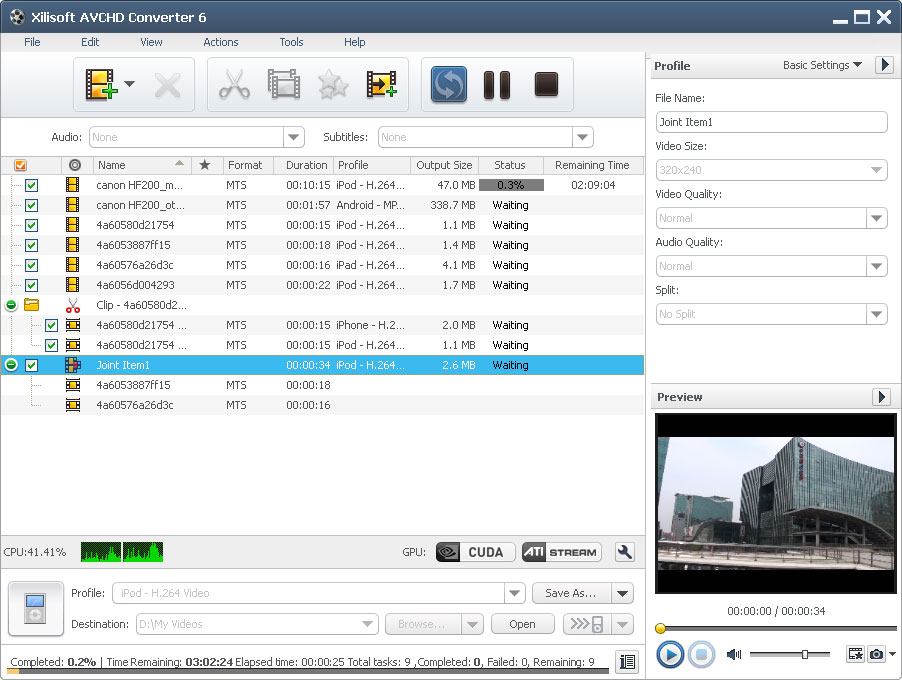
Shot by Sony, Canon, Panasonic, JVC or Hitachi AVCHD camcorder, AVCHD camcorders is more and more prevailing currently. Now, with Xilisoft AVCHD Converter you can enjoy AVCHD videos on your iPod, iPhone, iPad or upload them to website and share with your friends.
Xilisoft AVCHD Converter is a powerful and multi-functional software to convert AVCHD videos in formats of MTS, M2TS, MOD and HDV to the most common videos and HD videos for playing well on various multimedia players.
- Convert AVCHD video (MTS, M2TS, MOD) to popular video and HD video
- High compatibility with various AVCHD camcorders and players
- Powerful editing functions to polish your shot video
- Extract audio and convert AVCHD video to picture
- Transfer the output to iPad/iPhone/iPod/PSP/iTunes directly after conversion
- Support NVIDIA CUDA & ATI Stream technology

Safe Download 100% Virus Free

Secure Online Payment

30 Days Money Back Guarantee

Free Customer Service



Convert AVCHD Videos to High Definition Videos/Common
Videos/Audios 
Convert AVCHD videos shot by AVCHD camcorders to HD videos/SD videos/audios in fine quality
- Support Most AVCHD Camcorders
Support most AVCHD camcorders in mainstream, such as Sony, Canon, Panasonic, JVC, Hitachi AVCHD camcorder and so on. - Convert AVCHD Videos to High Definition(HD) Videos
Xilisoft AVCHD Converter is able to convert MTS, M2TS, MOD and HDV AVCHD videos to HD videos in formats of H.265/HEVC, MPEG-2 HD, MPEG-4 TS HD, MPEG-2 TS HD, Quick Time HD, WMV HD with great quality reserved. - Convert AVCHD Videos to Most Common Videos
Xilisoft AVCHD Converter can also convert MTS, M2TS, MOD and HDV AVCHD to the most popular videos in formats of AVI, MPEG, WMV, DivX, MP4, RM, MOV, XviD, 3GP, FLV, SWF and etc. - Compatible with Various Multi-media Devices
Enjoy watching AVCHD videos on various multi-media devices like iPod touch, iPhone, Apple TV, PS3, PSP, Zune, Xbox and etc. - Extract Audios from AVCHD Videos
Extract audios from AVCHD videos to MP3, WMA, WAV, RA, M4A, AAC, AC3, OGG format music for enjoying them on various media players. - Transfer AVCHD Videos to iPad
Also as an AVCHD to iPad transfer, Xilisoft AVCHD Converter allows you to convert and transfer AVCHD videos to iPad, iPhone 4, iPod, PSP and even iTunes in one click. - Support NVIDIA CUDA & ATI Stream Technology
Adopt NVIDIA CUDA & ATI Stream acceleration technology to gain remarkable performance in AVCHD video converting .

Customize Output by Clipping, Cropping, Adding Special Effects
Customize output files by clipping segments, cropping playing areas, adding subtitle, watermark and other artistic effects
- Clipping Video Segments
Xilisoft AVCHD Converter enables you to clip video segments you like and merge them together to make a new video as you want. - Crop Video Frame
Crop video frame to define the playing area; remove black edge, commercial logo or other else you don't want to keep. - Add Special Artistic Effects
You are free to add special artistic effects to the outputted videos. Add subtitle to the video to your preference, authorize your video with stylish watermark, and attach Snowflake, Mosaic, Sand, Old Film and other artistic effects to make your video impressive. - Parameter Customization
A wide range of parameters are provided to adjust the output effects, including bit rate, sample rate, frame rate, codec, resolution, channel and so on.


- Output One Source to Multiple Profiles Simultaneously
Xilisoft AVCHD Converter allows you to output one source AVCHD video to different profiles simultaneously for diverse usage. - Preview and Snap
Preview source AVCHD video in the built-in multi-media player, you can also view the source and the modified video at the real time comparatively to check the added effects. Capture snaps to record your favorite scenarios in preview and save them to BMP, GIF, JPEG, PNG format pictures. - Bitrate Calculator
Bitrate calculator is offered to compute accurate file size. - Background Running
Background running is available, convert AVCHD videos at the background to save memory and CPU resource. - Task Finished Action
Exit, hibernate, shutdown, standby or no action after the converting tasks are finished. - Multilingual Interface
English, German, Spanish, French, Italian, Japanese, Simplified and Traditional Chinese interface languages are optional.
| Output Devices Supported | |
| iPad, iPad mini, iPad Air, iPad Pro (12.9/9.7/10.5/11 inch), iPod nano/mini/shuffle/classic/touch, iPhone 3G/3GS/4/5/5S/5C/SE/6/6S/7/8/X/XS/XR/11/12/13/14/15 Series. Apple TV PSP, PS3 Xbox, Xbox 360 General 3GP mobile phone, BlackBerry, etc. General MP4 players: Archos, Creative Zen, iRiver, etc. Android mobile devices: Samsung Galaxy Note II (n7100), Samsung Galaxy S III (i9300), Samsung Galaxy S II (i9100), LG Optimus 4X HD (P880), LG Optimus 2X (P990), HTC DROID DNA (X920), HTC EVO 4G LTE (ONE X), HTC ONE V, Motorola DROID RAZR MAXX HD, Motorola Photon Q ,Sony Xperia TL (LT30), Sony Xperia S (LT26), Sony Xperia P (LT22) Google mobile devices: Google Nexus 4 Windows mobile devices: Nokia Lumia 920, Nokia Lumia 820, HTC Windows Phone 8X, HTC Radar 4G, Samsung Focus S, Pocket PC, Dell Axim X51, HP iPaq hw6500 series, etc. | |
| Input File Formats Supported | |
| Video | MTS, M2TS, MOD |
| Output File Formats Supported | |
| Video | AVI, MPEG, WMV, MP4, MPEG-4, DivX, XviD, MOV, RMVB, ASF, 3GP, 3G2, VOB, DV, H.264/MPEG-4 AVC (*.mp4), H.265/HEVC(*.mkv; *.ts), MKV |
| Audio | MP3, WMA, AAC, WAV, OGG, FLAC, APE, M4A, RA, AC3, MP2, AIFF, AMR, SUN AU Format |
| Image | BMP, GIF, JPEG, PNG |
| OS | Microsoft® Windows 11 / 10 / 8 / 7 / Vista / XP (SP2 or later) |
| Processor | 1GHz Intel/AMD processor or above |
| RAM | 256MB RAM (512MB or above recommended) |
| Free Hard Disk | 50MB space for installation |
| Graphics Card | Super VGA (800×600) resolution, 16-bit graphics card or higher |


