
Xilisoft AVI to MOV Converter
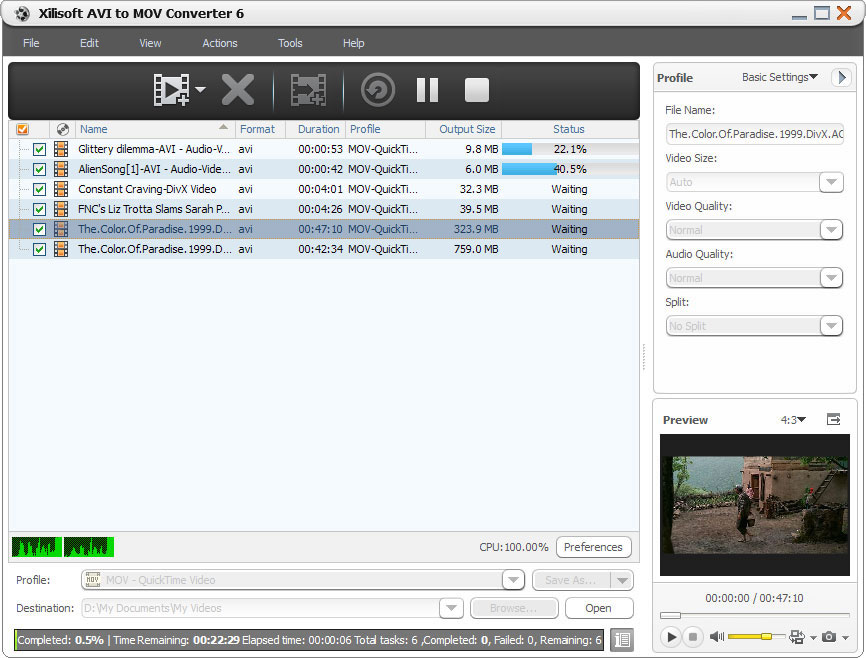
Xilisoft AVI to MOV Converter can help you convert AVI videos to QuickTime format (MOV), load as many files as you want and convert all at the same time.
Split a large AVI file to smaller MOV files; customize output files size with bit rate calculator; pick out certain segment to convert; adjust output parameters such as quality, codec, bit rate and frame rate, resolution and others.
- Convert AVI to QuickTime MOV videos
- Convert in batches
Customers Also Choose:

Xilisoft Video Converter Ultimate
Convert common and HD/3D videos in 160+ formats. Merge, clip, split, add video effects, watermark, subtitle, soundtrack, etc to better enjoy it.


- Convert AVI to MOV
It's easy to convert, just load the files and hit convert. - High Conversion Speed
High conversion speed meaning more cores are supported, multi-core or dual-core processors.

Files Flexible Settings 
Split video file, customize output file size, pick up any segment, adjust output parameters
- Split One File into Several Ones
The AVI to MOV converting software can split one file into several small ones in case the file is too large for your devices. - Customize Output File Size
Input your preferred output file size on the bit rate calculator and it would do the compressing for you. - Convert Any Video Segment
Set start and duration of the certain video segment you want to clip and convert. - Classified and Adjustable Output Parameters
Output parameters are classified and can be adjusted freely: video codec, video size, bit rate, frame rate, audio codec, channels, etc.

Other Extra Options
Batch process, background run, after done action, preview, auto update check, and more
- Background Run and After Done Action
Specify this software to run in the background and perform quit, shut down, hibernate or standby after done action automatically for your convenience. - Preview, Snapshot
Preview source video file in the built-in resizable player (supports 4:3 and 16:9 zoom mode) and take snapshot anytime during preview. - Power Management
Allows you to manage your system power in this 3GP converter. - Interface Languages
6 Languages to choose from: English, Japanese, German, Spanish, French and Chinese.
| Input File Formats Supported | |
| Video | AVI |
| Output File Formats Supported | |
| Video | MOV |
| Image | BMP, JPEG, GIF, PNG |
| OS | Microsoft® Windows 11 / 10 / 8 / 7 / Vista / XP (SP2 or later) |
| Processor | 1GHz Intel/AMD processor or above |
| RAM | 256MB RAM (512MB or above recommended) |
| Free Hard Disk | 100MB space for installation |
| Graphics Card | Super VGA (800×600) resolution, 16-bit graphics card or higher |


