
Xilisoft AVI to SWF Converter
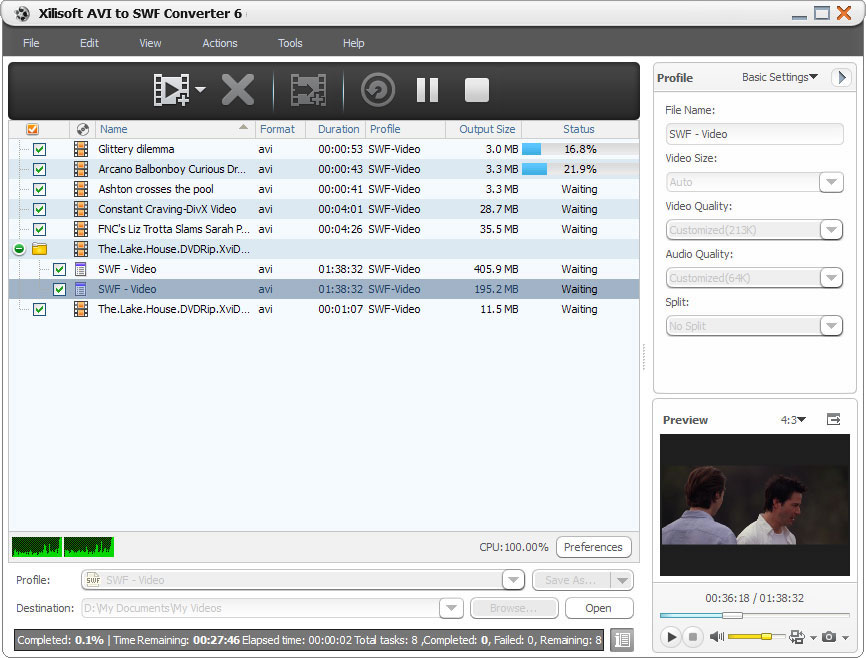
Sharing your AVI video files on the internet can be easily accomplished by using Xilisoft AVI to SWF Converter, which can quickly convert AVI to SWF video files, enabling you to inset the SWF videos into HTML page easily. Almost all Internet-enabled desktops, handsets and mobile devices can play SWF videos once with Flash Player installed.
For playing output SWF files normally, Xilisoft AVI to SWF Converter will automatically split large file, enabling the output SWF video not to exceed 16000 frames. Apart from this, this converter also allows you to make adjustment to video/audio quality, frame rate, bit rate, sample rate and so on, thus you can get the Flash SWF videos fit streaming media better.
- Batch convert AVI video files to Flash SWF videos
- Convert AVI video files to stream them on the internet
Customers Also Choose:



- Convert AVI to SWF Video
To stream AVI video files on the internet, just convert AVI to SWF video file that can be played on almost all Internet-enabled desktops, handsets and mobile devices with Flash Player installed. - Multi-Core CPU Support, High Conversion Speed
Running the AVI to SWF conversion on multi-core CPU is supported. More cores quicken your AVI to SWF conversion.

Profuse Output Parameters, Varying Output Files 
Auto split file, customize output file size, extract any segment, set various parameters
- Auto Split File
When a file is too large, the AVI to SWF converter will automatically split it every 16000 frames to make the target SWF videos played normally. - Get Exact Output File Size
By computing the corresponding video bit rate of entered size, the built-in Bitrate Calculator tool assures you of the output file size you want. - More Classified Output Parameters
Set start time and duration of the segment you want to convert it only; adjust video codec, video size, bit rate, frame rate, audio codec, channels, and more parameters to satisfy different requirements. The modified parameters can be saved as a new profile for later use.

Convenient Options for Simplifying AVI to SWF Conversion
Batch process, background run, after done action, preview, auto update check
- Batch Convert AVI to SWF video
Batch process and multithreading helps you convert multiple AVI files at one time with this AVI to SWF converter. - Background Run and After Done Action
Run Xilisoft AVI to SWF Converter in the background to conserve CPU resources; set after done action (quit, shut down, hibernate or standby) before conversion to save trouble. - Preview, Snapshot
Preview source video file with the built-in resizable playe (supports 4:3 and 16:9 zoom mode) and take snapshot anytime during preview. - Power Management
Allows you to manage your system power in this AVI to SWF converter. - Interface LanguagesSeveral language interfaces: English, Japanese, German, Spanish, French and Chinese.
| Input File Formats Supported | |
| Video | AVI |
| Output File Formats Supported | |
| Video | SWF |
| Image | BMP, JPG, GIF, PNG |
| OS | Microsoft® Windows 11 / 10 / 8 / 7 / Vista / XP (SP2 or later) |
| Processor | 1GHz Intel/AMD processor or above |
| RAM | 256MB RAM (512MB or above recommended) |
| Free Hard Disk | 100MB space for installation |
| Graphics Card | Super VGA (800×600) resolution, 16-bit graphics card or higher |


