
Xilisoft CD Ripper
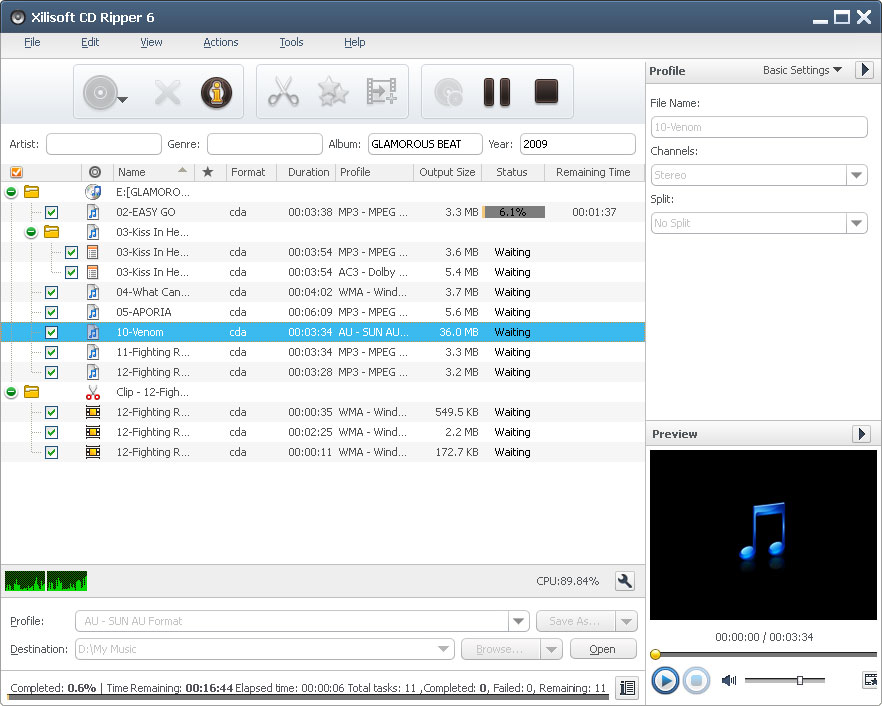
High-quality CD converting software, Xilisoft CD Converter converts CD to nearly all audio formats MP3, WMA, WAV, AAC, FLAC, OGG, APE and many others, making CDs available on different music players.
For satisfying special requirements, Xilisoft CD Converter also allows you to convert one audio track to multiple format music files at one go, split tracks, clip music segments, set audio effects such as fade-in/out, normalize, band pass, chorus, flanger, echo and speed, and do many more customizations.
Convert CDs in a wink with Xilisoft CD Converter. Download this amazing CD converter for a trial now!
- Extract CD soundtracks
- Convert CDs to MP3, WMA, WAV, AAC, FLAC, OGG, APE and many other audio formats
- Convert one CD soundtrack to different format music files in one go

Safe Download 100% Virus Free

Secure Online Payment

30 Days Money Back Guarantee

Free Customer Service


Batch CD Converting and Transferring 
Convert CD to different format music files in batches and transfer them to iPod/iPhone/PSP directly
- Convert CD to Music Files
Convert CD to audio files of different formats including MP3, WMA, WAV, AAC, FLAC, OGG, APE. - Batch Converting Multiple Audio Tracks
Convert multiple CD tracks to audio formats at once; convert one track to multiple formats simultaneously. - Convert and Transfer CD to iPod/iPhone/PSP
Options to transfer audio files to iPod, iPhone and PSP directly after converting.

Add Effects, Clip/Split/Customize Files
Lots of customization options available for you to convert CD to audio files of your own
- Apply Audio Effects
Add and adjust fade-in, fade-out, volume normalize, band pass, chorus, flanger, echo and speed effects to your audio tracks. - Split Audio Tracks
Split your audio tracks according to split size or duration you choose or customize prior to converting. - Clip Audio Segments
Extract multiple audio segments you want from CD tracks for converting. - Adjust Output Parameters
Make adjustment of the output parameters to customize the outputted audio; edit ID3 tag info of your audio tracks.


- Converting at High Speed
Convert CDs with multiple CPU cores and multiple threads for maximum CD converting speed. - Background Converting
Set Xilisoft CD Ripper to work in the background to spare CPU resources for others. - Post-Task Action
Auto-exit the application, shut down, hibernate, stand by system, or do nothing after converting to keep you from waiting in front your computer. - Multilingual Interface
Xilisoft CD Ripper comes with English, German, Spanish, French, Japanese and Chinese interface languages.
| Output Devices Supported | |
| iPod, iPhone, PSP, MP3 players | |
| Input File Format Supported | |
| CD | Audio CD |
| Output File Formats Supported | |
| Audio | AAC, AC3, AIFF, APE, AU, FLAC, M4A, MP2, MP3, OGG, RA, WAV, WMA, WAV lossless, WMA lossless |
| OS | Microsoft® Windows 11 / 10 / 8 / 7 / Vista / XP (SP2 or later) |
| Processor | 1GHz Intel/AMD processor or above |
| RAM | 256MB RAM (512MB or above recommended) |
| Free Hard Disk | 100MB space for installation |
| Graphic Card | Super VGA (800×600) resolution, 16-bit graphics card or higher |
| Others | CD/DVD drive |


