
Xilisoft DPG Converter
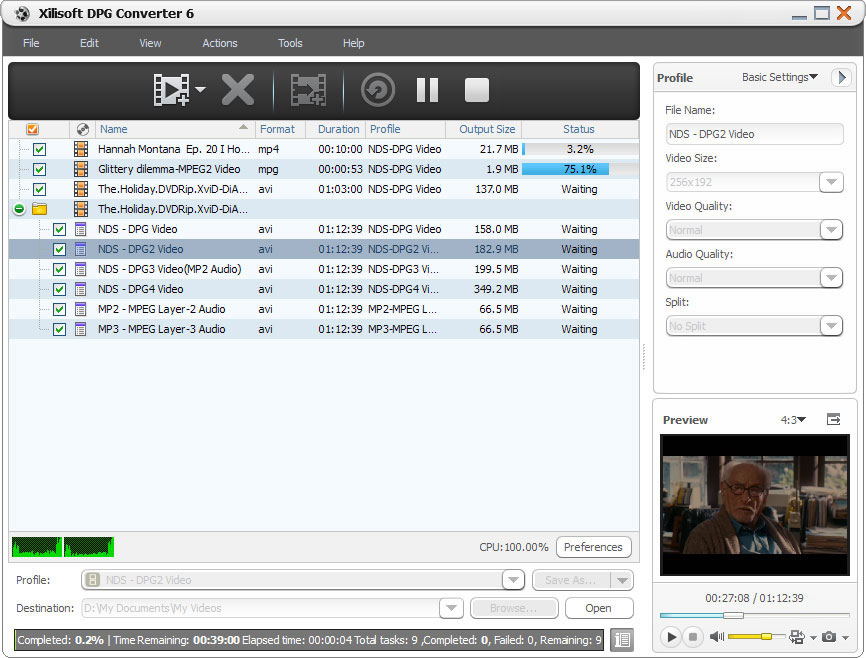
Ever wanted to watch and listen to your favorite movies or music on your Nintendo DS? Xilisoft DPG Converter is the right solution to decode videos for Nintendo DS users. Convert your favorite audio and video files to play with your Nintendo DS. Convert almost all popular audio and video formats LIKE AVI, MPEG, H.264/AVC, 3GP, WMV, MP4, DivX, MOV, RM, WMA, WAV, AAC, OGG, etc to DPG/DPG2/DPG3/DPG4 video or MP3/MP2 audio with Xilisoft DPG Converter.
Additional features such as adjustable FPS (frames-per-second) and bit rate, for smoother and clearer videos on your DS!
- Convert popular video formats to DPG/DPG2/DPG3/DPG4
- Extract MP3/MP2 audio
- Adjustable frame speed (FPS) and bit rate
Customers Also Choose:

Xilisoft Video Converter Ultimate
Convert common and HD/3D videos in 160+ formats. Merge, clip, split, add video effects, watermark, subtitle, soundtrack, etc to better enjoy it.

Transfer audios and videos to Nintendo DS 
Support decoding all popular video and audio formats and converting to DPG/MP3/MP2
- Convert to DPG Video
Convert video files with formats in AVI, MPEG, H.264/AVC, 3GP, VOB, DAT, WMV, MP4, DivX, MOV, RM, and ASF to play on Nintendo DS (DPG/DPG2/DPG3/DPG4) format. - Convert to MP2 Audio
Extract dialogue or background music from video files and convert to MP3/MP2 audio file and convert audios like WMA, WAV, M4A, AAC, AC3, OGG, CUE, APE, CDA to MP3/MP2 compatible to play with Nintendo DS. - High Quality Animation
It converts animation file to DPG video while still preserving the high quality FPS for smooth playback on your Nintendo DS.

Multi-Core or Dual-Core Support
Process one task with multi-thread on multi-core, no other plug-ins/programs needed
- High Conversion Speed
Converting on dual-core or multi-core support means high speed conversion while maintaining the high audio and video quality. - No Other Plug-Ins and Programs Needed
No need to install other programs for conversion, Xilisoft DPG Converter does all DPG-related conversion.

Customized output audio/video files
Adjust FPS/bit rate , compress/trim files, output diverse files from one at one time
- Adjustable FPS and Bit Rate
FPS (frames per second), bit rate and other parameters are adjustable to make your video and audio files play smoothly and clearly after DPG-conversion. - File Compress
Compress a large file into a smaller one so you can fit them on your DS; calculate the output file size even before conversion with the bit rate calculator. - Cut a Certain Segment
Specify a certain segment to convert by setting the start time and duration of the clip. - Convert from One Source Simultaneously
To save time, convert in batches or in multiple files at the same time. It is also possible to set different profiles like FPS and bit rate for each output file. - Classified and Adjustable Output Parameters
Output parameters are classified and can be adjusted freely: video codec, video size, bit rate, frame rate, audio codec, channels, etc.

Preview and Multitask
Preview video before conversion and convert loaded videos to DPG/MP3/MP2 in batches
- Preview and Snapshot
Preview video before conversion with the built-in resizable player (supports 4:3 and 16:9 zoom mode) and snap the screens you love. - Batch Processing and Multithreading
Load as many files as you wish and convert them all at the same time. - Run in Background
Run the software in the background while you do other things on your computer to multitask and save time. - Power Management
Allows you to manage your system power in this DPG converter. - Set Action After Conversion
Set an action to do: hibernate, shut down, exit or standby after a conversion is done to avoid waiting. - Interface Languages
Different interface languages to choose from: German, Chinese, English, Japanese, French and Spanish.
| Output Device Supported | |
| iPad mini, iPad mini with Retina display, iPad 4, iPhone 5, iPod touch 5, iPod nano 7 Nintendo DS Android mobile devices: Samsung Galaxy Note II (n7100), Samsung Galaxy S III (i9300), Samsung Galaxy S II (i9100), LG Optimus 4X HD (P880), LG Optimus 2X (P990), HTC DROID DNA (X920), HTC EVO 4G LTE (ONE X), HTC ONE V, Motorola DROID RAZR MAXX HD, Motorola Photon Q ,Sony Xperia TL (LT30), Sony Xperia S (LT26), Sony Xperia P (LT22) Google mobile devices: Google Nexus 4 Windows mobile devices: Nokia Lumia 920, Nokia Lumia 820, HTC Windows Phone 8X, HTC Radar 4G, Samsung Focus S | |
| Input File Formats Supported | |
| Video | VOB HD Video (*.vob), H.264/AVC HD Video (*.mp4), (DVD Video Files), MPEG4 HD Video (*.mp4), MPEG2 HD Video (*.mpg; *.mpeg), MPEG4 TS HD Video (*.ts), Quick Time HD Video (*.mov), VCD Video File (*.dat), WMV HD Video (*.xwmv), Audio-Video Interleaved HD Video (*.avi), M4V, SWF, MKV, DV, DIF, FLV, MJPG, MJPEG, MPG, MP4, MPEG, DVR-MS, NUT, MOV, QT, H261, H.264/AVC, RM, TS, RMVB, WMV, YUV, ASF, DAT, VOB, MPV, NSV |
| Audio | AAC, AC3, AIFF, CDA, APE, CUE, OGG, RA, AU, WAV, WMA, FLAC, MP2, MP3, MPA, RAM |
| Output File Formats Supported | |
| Video | DPG, DPG2, DPG3, DPG4 |
| Audio | MP3, MP2 |
| Image | BMP, GIF, JPEG, PNG |
| OS | Microsoft® Windows 11 / 10 / 8 / 7 / Vista / XP (SP2 or later) |
| Processor | 1GHz Intel/AMD processor or above |
| RAM | 256MB RAM (512MB or above recommended) |
| Free Hard Disk | 100MB space for installation |
| Graphics Card | Super VGA (800×600) resolution, 16-bit graphics card or higher |


