
How to burn AVI to DVD?
There are a lot of videos and movies which we consider valuable and collect appropriately in our computer. Days goes on, we will have more and more movies saved, which will occupy too much space in computer. With burning to DVD, we could save them well.
AVI is very common video format for our videos. How to burn AVI to DVD? Xilisoft DVD Creator is perfect AVI to DVD Converter to help you burn AVI to DVD in batches, even if you are a novice. And it can also burn a lot of other video formats like MPEG, DivX, DV, VOB, WMV or iPhone 4/iPhone 4S videos (MOV) to DVD that is compatible to play with most portable or home DVD players. You can even burn DVD with custom menu, audio tracks, subtitles, video thumbnails and video effect. Just free download to enjoy it right now.
The tips below will show you how to convert and burn AVI to DVD:
1. Free Download Xilisoft DVD Creator and install to your computer. Insert a DVD+R (DVD-R, DVD+RW or DVD-RW). Run the DVD Creator and add the AVI files you want to convert by clicking "Add Files" button under the "File" menu.
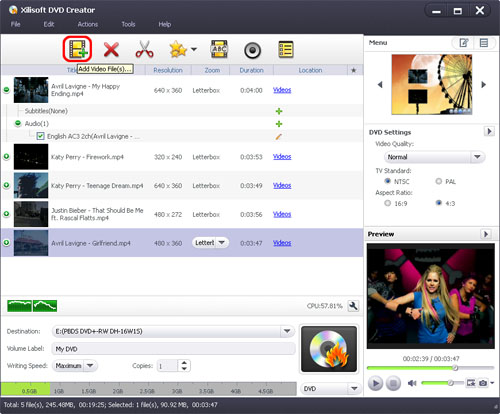
2. You can customize the output aspect resize method by selecting the file's title and clicking the "Resize Method" combo-box, and then you will find 3 choices for you to set it at will.
There are 3 choices for you:
Letterbox: add black stripes to fit the output aspect ratio.
Pan and Scan: crop frame to fit the output aspect ratio.
Full Screen: stretch and compress frame to fit the output aspect ratio.
3. Optional: Before burning the files, you can choose the background of the DVD menu at will by selecting one from the right part of the interface.

4. You can start to burn the AVI video file by clicking "Start Burn" button. Or you can click "start burn" button in the main interface.
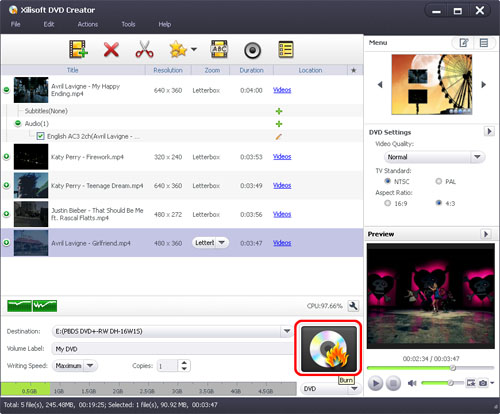
After the file is burned, you will be able to enjoy your beloved AVI files on any DVD player!
The AVI to DVD creator is a powerful and easy-to-use video to DVD converter and burner which supports converting AVI to DVD, MPEG to DVD, WMV to DVD, etc. You can know more detailed info about burn DVD movie from AVI.


