
Xilisoft DVD to Apple TV Converter
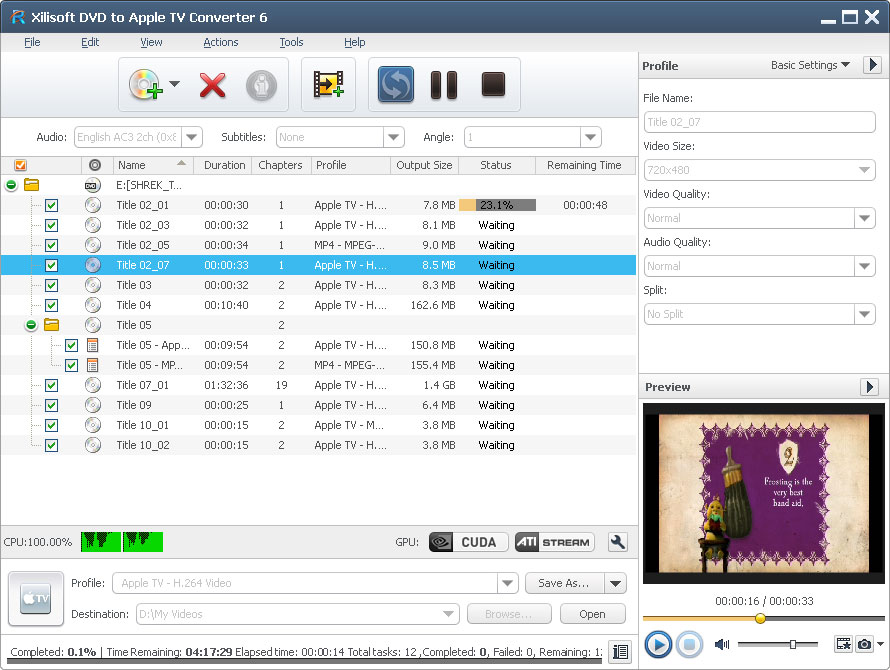
Turn your Apple TV into a real Home DVD movie library without spending a single cent! With Xilisoft DVD to Apple TV Converter, you can enjoy favorite Home DVD movies on widescreen TV! The software converts Home DVD to MP4 and MPEG-4 format to play with your Apple TV, and even converts audios from Home DVD like MP3, AAC and M4A. Support for NVIDIA CUDA & AMD APP technology which can deliver huge gains when converting DVDs and up to 5X faster performance in processing.
Options like custom file size, subtitle, audio and angle, split file and trim Home DVD are available for your personal video and audio editing choices. In addition, Xilisoft DVD to Apple TV converts files in lightning speed so that you’ll be able to watch your videos in no time!
- Convert audio files MP3, AAC, WAV
- Convert video files MP4, MPEG-4
- Support convertingHome DVD segment and splitting file to Apple TV file
- Can't rip/convert DVD with copyright

Customers Also Choose:

Xilisoft iPhone Magic Platinum
Complete solutions to transfer, backup and manage iPhone/iPad/iPod contents, convert videos and download online videos to iPhone/iPad/iPod.

Xilisoft Video Converter Ultimate
Convert common and HD/3D videos in 160+ formats. Merge, clip, split, add video effects, watermark, subtitle, soundtrack, etc to better enjoy it.

Numerous Settings for DVD Converting 
Transport all of your favorite DVD movies to Apple TV and enjoy them
- Multiple Files; Multiple Formats
Load several files to convert and even set different file formats for each file and convert simultaneously. - View DVD Info
Load your DVD disc, go online and fetch DVD info to enrich your multimedia library with details such artists' name, director, release date, file name and more! - Convert and Split
Convert files from a DVD while splitting it simultaneously; set a certain split time and duration for output files. - Custom File Size
Calculate desired file size with the bit rate calculator even before converting to avoid errors and mistakes.

Do More; Save Time
High level of customization to convert DVD to Apple TV video perfect and convenient
- Optimized for NVIDIA CUDA & AMD APP
Support for NVIDIA CUDA & AMD APP technology which can deliver huge gains when converting DVDs and up to 5X faster performance in processing. - Adjustable File Properties
Choose from the available properties or modify your preferred file properties and save it as your own file setting. - Numerous Options
You can set subtitles, choose a camera angle, or edit your output video (set as black and white or old movie). - Preview Movie
You can preview your DVD movies with the built-in resizable player before converting to Apple TV. You can even take a snapshot during preview and save as your own picture file. - Run in Background
Run the converter in the background without conflicting other programs or slowing your computer down.


- Log Files and Conversion Info
Information such as bit rate, stream, frame, codec and other file properties can be viewed during the conversion at the progress bar and log file. - Power Management
Easy power management is available in this DVD to Apple TV converter. Languages
Choose from English, Japanese, Chinese, German, Spanish and French languages.
| Output Devices Supported | |
| iPod touch 5, iPod nano 7, iPad mini, iPad mini with Retina display, iPad 4, iPhone 5, Apple TV Android phone: Samsung Galaxy Note II (n7100), Samsung Galaxy S III (i9300), Samsung Galaxy S II (i9100), LG Optimus 4X HD (P880), LG Optimus 2X (P990), HTC DROID DNA (X920), HTC EVO 4G LTE (ONE X), HTC ONE V, Motorola DROID RAZR MAXX HD, Motorola Photon Q, Sony Xperia TL (LT30), Sony Xperia S (LT26), Sony Xperia P (LT22) Google phones: Google Nexus 4 Windows phone: Nokia Lumia 920, Nokia Lumia 820, HTC Windows Phone 8X, HTC Radar 4G, Samsung Focus S |
|
| Input File Formats Supported | |
| DVD-Video, DVD folder, DVD IFO file | |
| Output File Formats Supported | |
| Video | MP4, H.264/MPEG-4 AVC, MPEG-4, FLV |
| Audio | MP3, WAV, AAC |
| Image | BMP, GIF, JPEG, PNG |
| OS | Microsoft® Windows 11 / 10 / 8 / 7 / Vista / XP (SP2 or later) |
| Processor | 1GHz Intel/AMD processor or above |
| RAM | 256MB RAM (512MB or above recommended) |
| Free Hard Disk | 100MB space for installation |
| Graphics Card | Super VGA (800x600) resolution, 16-bit graphics card or higher |
| Others | DVD-ROM drive |


