
Xilisoft DVD to iPad Converter for Mac
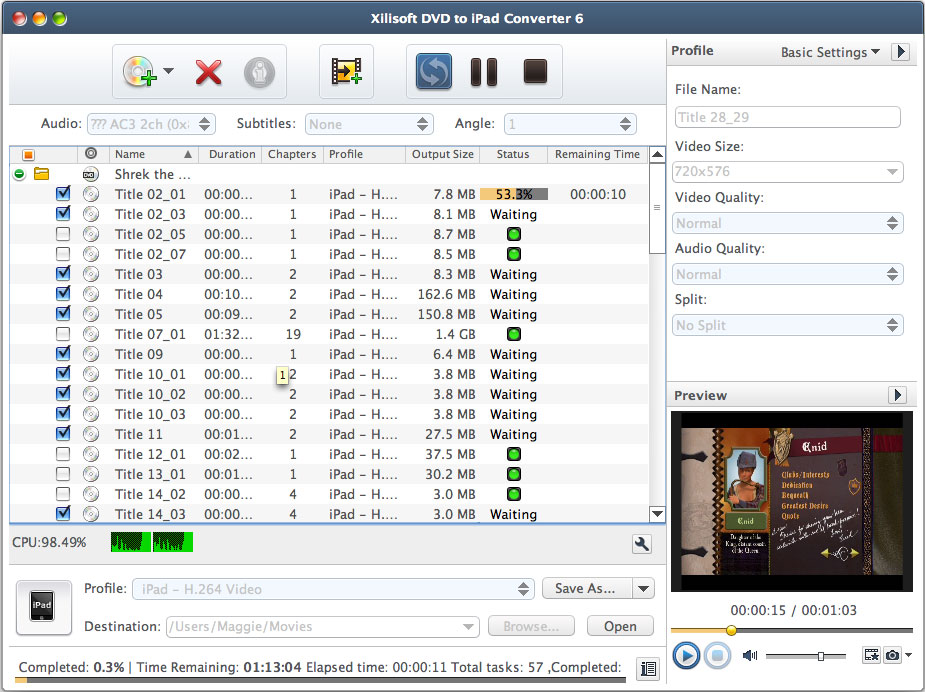
Solving your problem of how to play Home DVD movies on your iPad, Xilisoft DVD to iPad Converter for Mac can convert Home DVD movie to iPad H.264 HD, iPad H.264, MP4, and MPEG-4 videos in different resolutions (1280*720, 720*480, 640*480), and convert Home DVD audio to iPad music of MP3, AAC or M4A format.
Multi-core CPU, multi-threading and multi-file conversion will greatly speed up and simplify the Home DVD to iPad conversions. Have a FREE trial of Xilisoft DVD to iPad Converter for Mac now and start to enjoy high-resolution Home DVD movies on your iPad!
- Convert Home DVD to iPad HD videos (H.264 HD) on your Mac
- Convert Home DVD movies to iPad video formats (MPEG-4, MP4, H.264)
- Convert Home DVD audio to iPad audio formats (MP3, AAC, M4A)
- Output to devices direcly after conversion
- Can't rip/convert DVD with copyright


Safe Download 100% Virus Free

Secure Online Payment

30 Days Money Back Guarantee

Free Customer Service
Customers Also Choose:

Xilisoft iPhone Magic Platinum for Mac
Transfer contents between iPhone and Mac/iTunes. Manage iPhone easily. Convert DVD, CD, videos, audios to iPhone.

Xilisoft Video Converter Ultimate for Mac
Convert common and HD/3D videos in 160+ formats on Mac. Merge, clip and split videos, add video effects, watermark, subtitle, soundtrack, etc.

Convert DVDs for iPad on Mac 
The perfect way to make DVD movies compatible with your iPad on your Mac
- Convert DVD to iPad Video
Convert DVD to iPad H.264 HD, H.264, MP4 and MPEG-4 videos on Mac. - Convert DVD to iPad Music
Extract DVD soundtracks and convert them into iPad MP3, AAC and M4A music files.


- One Input, Multi-Format Output
Convert a file into multiple format files at one go. - Set Output File Size
The Bitrate Calculator tool can help you get your desired output file size before converting. - Convert Segment
Extract any part of a DVD movie and convert it to iPad video or music. - Split DVD Title
Set a split mode to let the converter automatically split a DVD title into several parts to your taste.


- Batch Converting
Supports multi-threading to offer you the highest conversion speed possible; allows converting multiple files at the same time. - Preview and Snapshot
Preview videos in the built-in resizable player and take snapshot anytime during preview. - Multiple Interface Languages
Including English, French, German, Japanese, Spanish and Chinese.
| Output Device Supported | |
| iPad, iPad mini, iPad Air, iPad Pro (12.9/9.7/10.5/11 inch), iPod nano/mini/shuffle/classic/touch, iPhone 3G/3GS/4/5/5S/5C/SE/6/6S/7/8/X/XS/XR/11/12/13/14/15 Series. Android phone: Samsung Galaxy Note II (n7100), Samsung Galaxy S III (i9300), Samsung Galaxy S II (i9100), LG Optimus 4X HD (P880), LG Optimus 2X (P990), HTC DROID DNA (X920), HTC EVO 4G LTE (ONE X), HTC ONE V, Motorola DROID RAZR MAXX HD, Motorola Photon Q, Sony Xperia TL (LT30), Sony Xperia S (LT26), Sony Xperia P (LT22) Google phones: Google Nexus 4 Windows phone: Nokia Lumia 920, Nokia Lumia 820, HTC Windows Phone 8X, HTC Radar 4G, Samsung Focus S | |
| Input File Formats Supported | |
DVD-Video, DVD folder, DVD IFO File | |
| Output File Formats Supported | |
| Videos | MP4, MPEG-4, H.264, HD H.264 |
| Audios | MP3, M4A, AAC |
| Images | BMP, GIF, JPEG, PNG |
| OS | Mac OS X v10.6 - 10.14(Mojave) |
| Processor | Intel® processor |
| RAM | 512MB RAM |
| Free Hard Disk | 100MB space for installation |
| Graphic Card | Super VGA (800×600) resolution, 16-bit graphics card or higher |
| Others | DVD-ROM drive |


