
Xilisoft DVD to iPod Converter Tutorial
Referring FAQXilisoft DVD to iPod Converter helps you convert and convert DVD to iPod video MP4 format, DVD to iPhone, and DVD to iPod audio formats like MP3, AAC and M4A with excellent image/sound quality. It supports iPod, iPod touch, iPod nano and iPhone mobile.
Here is a step by step guide of Xilisoft DVD to iPod Converter 5. Hope useful for you!
- Download, install and start Xilisoft DVD to iPod Converter 5 and load DVD
Click "Open DVD" button, select a DVD (or DVD Folder, IFO file) in the dialog box that opens, and load it. The Loaded DVD's information, such as chapter, title, etc., will be shown in the file list.
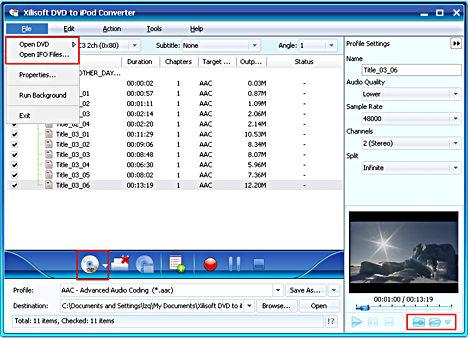
Tip1: Get DVD information.
After loading DVD, if the network is connected, click Get Disc info button in the toolbar, or click Edit>Get Disc Info in the menu, the software will retrieve loaded DVD information from Web database, and display the information in the file list, such as title name and chapter name.
Tip2: Take snapshot.
Select a video file in the file list, click Play button in the video preview window. When the video jumps to the image you like, click Snapshot button, to store the image in the snapshot folder.
You can set the snapshot folder by yourself. To do this, click Config snapshot folder from Settings drop down list, select the snapshot folder you want in the dialog box that opens.
- Select output format
Select one or more files in the list, click Profile drop-down button, select an output format for selected files in the drop down list that opens.
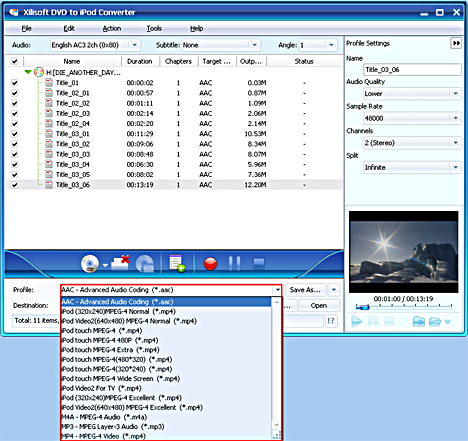
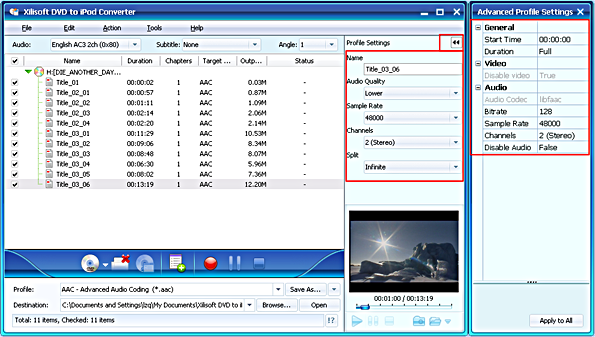
Tip1: To adjust output settings, you can set the detailed parameters of output format in the profile panel of right window.
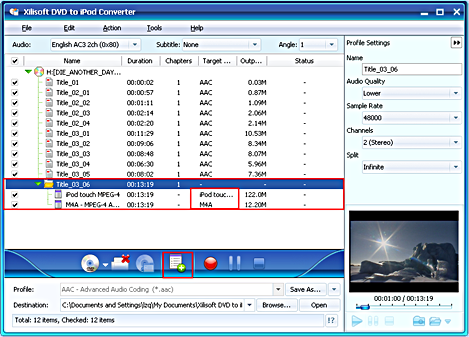
Tip2: Set multiple output formats for one file.
The software supports to output multiple files with different formats for one video. To do this:
- Select a file in the file list.
- Select an output format in the Profile.
- Click Add profile button, the software will create a profile directory under the selected file automatically.
- Select a new profile, click profile dropdown button, and select a new output format from the list.
Tip3: Custom output size.
The software provides customizing the size of the output file.
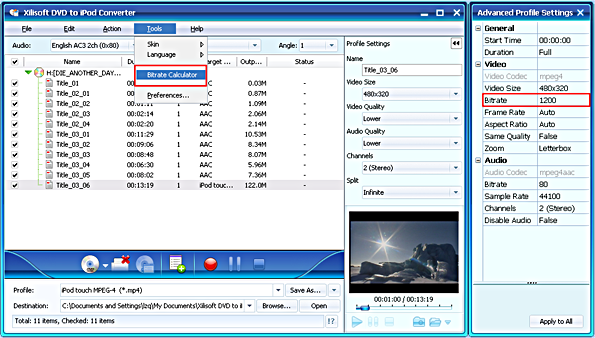
To do this, please click Tools>Bitrate Calculator to open Bitrate Calculator dialog box, select a file size you want, or enter the file size in the textbox directly.
Meanwhile, you can also set audio bit rate and video bit rate in this dialog box.

- Set output folder
Click Browse button in setting panel, select a destination folder in the dialog box that opens, and click OK.

- Extract file
After finishing the above settings, check the needed file to extract in the file list, click Start Converting button on the main interface, to start extracting the file. You can view the progress of the extracting process from the progress bar at the bottom of the window.
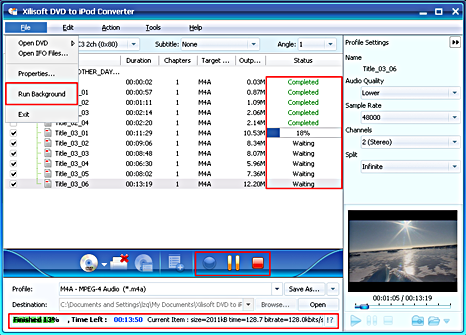
Tip1: You can click Pause Converting button to pause the extracting process and Stop Converting button to cancel the process as required.
Tip2: You can choose to run it background by choosing File> Run Background.


