
Xilisoft FLV to MOV Converter
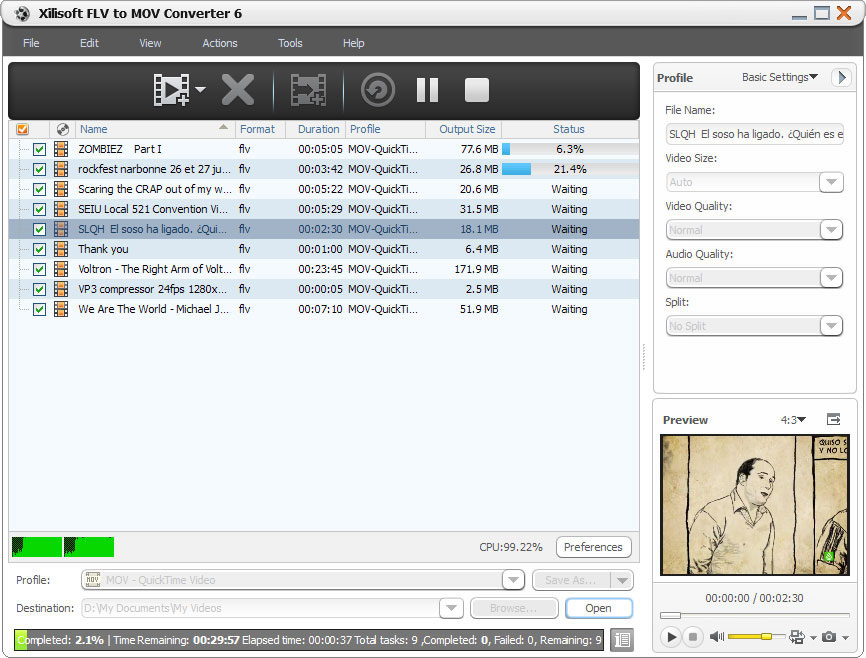
To get FLV videos compatible with QuickTime player, you may use Xilisoft FLV to MOV Converter. This smart FLV to MOV converter software can batch convert FLV video files to QuickTime MOV videos at super fast speed on multi-core CPU.
With this FLV to MOV converter, you can output MOV video files with different resolutions, bit rate, file size and quality in the way of splitting video file by preset split mode, customizing the output file size, extracting your favorite video segment and setting other advanced parameters. Download Xilisoft FLV to MOV Converter for free, and get FLV videos to be played on QuickTime player now!
- Batch convert FLV to MOV video files
- Convert FLV videos for playback on QuickTime player
Customers Also Choose:

Xilisoft DVD to Video Ultimate
Convert DVD to 160+ video/audio formats to play on various mobile phones and tablets. Clip/merge/split video, add subtitle, watermark, effects, etc.

Xilisoft Video Converter Ultimate
Convert common and HD/3D videos in 160+ formats. Merge, clip, split, add video effects, watermark, subtitle, soundtrack, etc to better enjoy it.

Convert FLV to MOV Video for QuickTime Player 
Fast convert FLV to QuickTime MOV video file on multi-core CPU
- FLV to MOV Video
Convert FLV to MOV video files for the convenience of enjoying on QuickTime player. - Multi-Core CPU Support, High Conversion Speed
The more cores you have in your computer, the faster your FLV to MOV conversion will be.

Abundant Parameters, Diversified Output Files
Split file, customize output file size, extract any segment, adjust advanced parameters
- Split Video File
Choose an appropriate split mode or customize your own split time/size to split a large file into several ones. - Specify Output File Size Accurately
To output a file with exact file size you want, you may reckon on the built-in Bitrate Calculator tool in this FLV to MOV converter. - Convert Your Favored Part Only
Keep your favored part with unwanted segments removed by setting its start time and duration when you do the FLV to MOV converting . - More Output Parameters
Output parameters are classified and can be adjusted freely: video codec, video size, bit rate, frame rate, audio codec, channels, etc. The modified parameters can be saved as a new profile for later use.

More Convenient Options, Easier and Faster FLV to MOV Conversion
Batch process, background run, after done action, preview, auto update check
- Batch Conversion and Multithreading
This FLV to MOV converter can batch convert multiple FLV video files at fast speed. - Background Run and After Done Action
Run this converter in the background to conserve CPU resources; set after done action (quit, shut down, hibernate or standby) before conversion to avoid waiting for the conversion to the end. - Preview, Snapshot, and More
Preview source video file in the built-in resizable player (supports 4:3 and 16:9 zoom mode) and take snapshot anytime during preview. - Power Management
Allows you to manage your system power in this FLV to MOV converter. - Interface Languages
Several language interfaces for Xilisoft FLV to MOV Converter: English, Japanese, German, Spanish, French and Chinese.
| Input File Formats Supported | |
| Video | FLV |
| Output File Formats Supported | |
| Video | MOV |
| Image | BMP, JPEG, GIF, PNG |
| OS | Microsoft® Windows 11 / 10 / 8 / 7 / Vista / XP (SP2 or later) |
| Processor | 1GHz Intel/AMD processor or above |
| RAM | 256MB RAM (512MB or above recommended) |
| Free Hard Disk | 100MB space for installation |
| Graphics Card | Super VGA (800×600) resolution, 16-bit graphics card or higher |


