
Xilisoft FLV to MPEG Converter
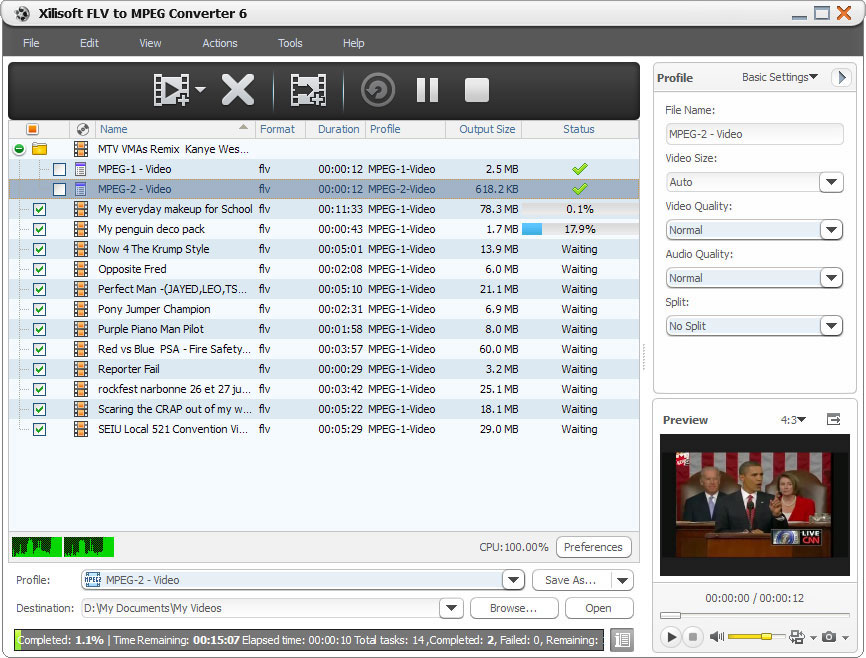
Xilisoft FLV to MPEG Converter provides you with the fastest and easiest way to convert FLV to MPEG1 and convert FLV to MPEG2 video files in batches for burning them to VCD/DVD disc.
If you want to output MPEG1/MPEG2 video files with different resolutions, bit rate, file size and quality, you may find this FLV to MPEG converter is really what you want, with which you can freely split a large file by preset split mode, customize the output file size, extract the video segment you like, and set other advanced parameters. Download Xilisoft FLV to MPEG Converter for a free trial now!
- Convert FLV to MPEG video files in batches
- Convert FLV to MPEG1, convert FLV to MPEG2 video file
Customers Also Choose:

FLV to MPEG Converter with Multi-core CPU Support 
Convert FLV to MPEG1, FLV to MPEG2 video file for burning to VCD/DVD disc
- Convert FLV to MPEG Video
Convert FLV to MPEG1 video, convert FLV video to MPEG2 for the convenience of burning to VCD/DVD. - Multi-Core CPU Support, High Conversion Speed
The more cores you have in your computer, the faster your FLV to MPEG conversion will be.

Personalize Output File with Rich Parameters
Split file, customize output file size, extract any segment, adjust advanced parameters
- Split Video File
To make the output files fit VCD/DVD disc well, you can choose an appropriate split mode to split a large file when converting FLV to MPEG. - Set Output File Size Freely
The built-in Bitrate Calculator tool helps you avoid the trouble of computing the bit rate according to the file size you want. - Convert any Video Segment
Remove the unwanted parts with the favorite segment reserved only by setting its start time and duration. - More Output Parameters
Output parameters are classified and can be adjusted freely in this FLV to MPEG converter: video codec, video size, bit rate, frame rate, audio codec, channels, etc.

Convenient Options for Facilitating FLV to MPEG Conversion
Batch process, background run, after done action, preview, auto update check and more
- Batch Conversion and Multithreading
Load multiple FLV video files to convert, and set the max simultaneous tasks, then let this FLV to MPEG converter batch convert them at fast speed. - Background Run and After Done Action
Running this converter in the background can conserve CPU resources, and setting after done action (quit, shut down, hibernate or standby) in advance can avoid waiting for the conversion to the end. - Preview, Snapshot
Preview source video file in the built-in resizable player (supports 4:3 and 16:9 zoom mode) and take snapshot anytime during preview. - Power Management
Allows you to manage your system power in this FLV to MPEG converter. - Interface Languages
Several language interfaces in Xilisoft FLV to MPEG Converter: English, Japanese, German, French and Chinese.
| Input File Formats Supported | |
| Video | FLV |
| Output File Formats Supported | |
| Video | MPEG1, MPEG2 |
| Image | BMP, JPEG, GIF, PNG |
| OS | Microsoft® Windows 11 / 10 / 8 / 7 / Vista / XP (SP2 or later) |
| Processor | 1GHz Intel/AMD processor or above |
| RAM | 256MB RAM (512MB or above recommended) |
| Free Hard Disk | 100MB space for installation |
| Graphics Card | Super VGA (800×600) resolution, 16-bit graphics card or higher |


