
Xilisoft iPhone Transfer
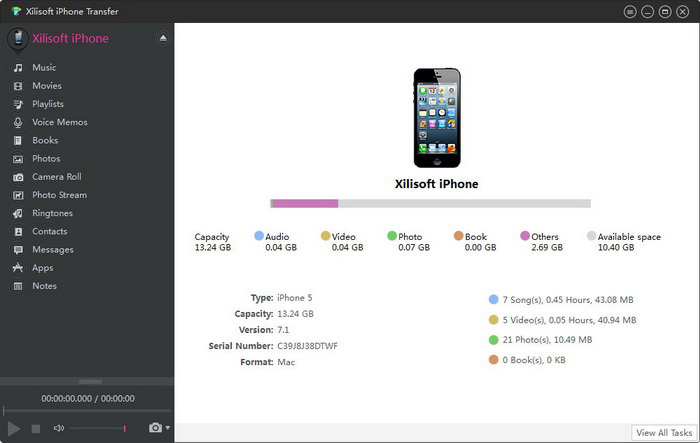
Xilisoft iPhone Transfer is a smart tool to synchronize your iPhone to your computer. It's the ideal iPhone manager to backup music, video and other contents to your computer, match your iPhone contents to iTunes and seamlessly copy files from computer to your iPhone.
Besides the music, video and file synchronization, you can even treat your iPhone as a portable hard disk when Xilisoft iPhone Transfer software is installed.
- Fully support all iPhone/iPad/iPod, iOS 17 and iTunes 12
- Backup iPhone contents to computer
- Backup messages and contacts to computer
- Export computer files to iPhone/iPad/iPod
- Synchronize iPhone music with iTunes library
- Manage iPhone music, movies, photos, books
- Support several iOS devices simultaneously


Safe Download 100% Virus Free

Secure Online Payment

30 Days Money Back Guarantee

Free Customer Service


iPhone – Computer – iPhone 
How to transfer from PC to iPhone, transfer music from iPhone to computer
- Backup iPhone Contents to Computer
Copy iPhone music, movies, videos, pictures, podcasts and other files to you computer and vice versa. Synchronize files to and from iPhone to your computer. Photos and videos recorded by the device are supported now. - App Transfer and App Document Management
Transfer application between your PC and iphone, and even manage document for the application which supports this operation. You can drag and drop the apps now. - Backup Messages and Contacts
Save messages from devices to PC for backup. Import contacts exported from Incredimail. - iTunes Support
Not only does it support between iPhone, iPod and computer, but it also syncs with iTunes. We are always updated with the latest version to suit your needs. Now supports iTunes 12.

Synchronize Seamlessly
Make use of iPhone for flash disk, and recognize your iPhone's information automatically
- Support All iPhone/iPad and iPod touch
Support all generations of iPhone and iPod touch: iPhone, CDMA iPhone 4, iPhone 3G, iPhone 3GS, iPhone 4, iPhone 4S, iPhone 5, iPhone 5s, iPhone 5c, iPhone/iPad/iPod, iOS 17, iPad Air, iPad2, New iPad, iPad min, iPod touch, iPod touch 5, iPod nano 7. You can transfer files between them. - Use iPhone as Hard Disk
Explore your iPhone files by treating it as a hard disk, browse through files using your Windows Explorer. - Display Details
You can view your device's properties and information on the main interface: type, generation, serial number, format, version and others.

Manage iPhone Files
Quickly view and search your iPhone files, create and edit playlist and photo albums
- Create and Edit Playlist
Create playlists for your iPhone, edit them as you wish. Playlists are good for the gym, office, travel and others. - Manage Photo Albums
Manage and organize photos and other digital pictures by creating and editing photo albums. Copy photos from photostream to computer. - Transfer and Manage Ringtones and Books
Transfer and manage iPhone ringtones and PDF or EPUB format eBooks easily. - Different View Modes
View your iPhone/iPod files in various modes: Song, Albums, Genres, Composers modes for music; Movies and Genres modes for movie files; Photos and Albums view modes for photo files. - Quick Filter and Search
Search through your files by genre, artist's name, album name, album year and others. For searching your library, just type in a keyword or the beginning of a title to filter through songs and files.


- Connect Several iOS Devices
Manage several iOS Devices simultaneously without conflicting each other's files. Copy files from other iPods without erasing other iPod files. - Fast Transfer Speed
Synchronize between files in fast transfer speed, no need to worry of your computer slowing down or conflicting with other programs. - Wi-Fi supported
Users can transfer files via Wi-Fi besides using data wire.
| Output Devices Supported | |
iPad, iPad mini, iPad Air, iPad Pro (12.9/9.7/10.5/11 inch), iPod nano/mini/shuffle/classic/touch, iPhone 3G/3GS/4/5/5S/5C/SE/6/6S/7/8/X/XS/XR/11/12/13/14/15 Series. | |
| File Formats Supported | |
| Video | M4V, MP4, MOV, MPEG-4, H.264 |
| Audio | AAC, MP3, WAV, AIFF, M4A |
| Image | BMP, GIF, JPEG, PNG |
| OS | Microsoft® Windows 11 / 10 / 8 / 7 / Vista / XP (SP2 or later) |
| Processor | 1GHz Intel/AMD processor or above |
| RAM | 256MB RAM (512MB or above recommended) |
| Free Hard Disk | 30MB space for installation |
| Graphic Card | Super VGA (800×600) resolution, 16-bit graphics card or higher |
| Others | iTunes 9.1 or above |


