
Xilisoft iPod Rip for Mac
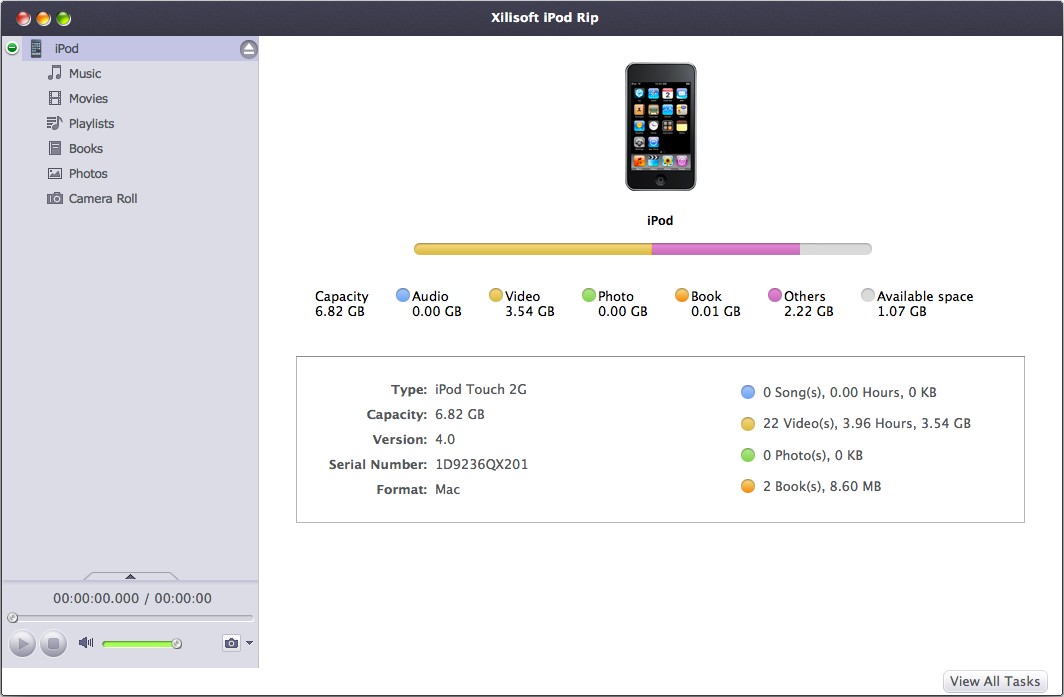
To help you manage iPod on Mac, Xilisoft iPod Convert for Mac makes it easy to backup iPod, transfer apps, music, movies, photos, books, etc from iPod to Mac, Mac to iPod, and iPod to iTunes.
Using the Mac iPod convert software, you can edit, create and delete iPod playlist in simple operations. It can also connect and manage several iOS devices at the same time to transfer and share your contents. Everything is so simple, just free download to enjoy it now.
- Fully support all iPhone/iPad/iPod, iOS 17 and iTunes 12
- iPod to Mac, copy music, backup videos and photos
- Mac to iPod, transfer local files from Mac to iPod/iPhone
- Import iPod/iPhone audio and video files to iTunes
- Create, delete and edit photo albums
- Import and export contacts
- Move music from one playlist to another


Safe Download 100% Virus Free

Secure Online Payment

30 Days Money Back Guarantee

Free Customer Service



Expedite file transfer 
Transfer music, movie and photo files between iPod (iPod touch 3.0), iTunes, and Mac
- Backup iPod file to Mac
You can easily and fast backup iPod apps, music, iPhone MSN messages, movie and photo on your Mac with the iPod copy tool. Reading/exporting videos and photos recorded by device are supported now. - Transfer file on Mac to iPod
Choose the apps, movie, music or photo you like on your Mac machine and directly put it on iPod through the iPod manager. You can also manage documents for some apps now. - Copy iPod file to iTunes
The software allows to copy iPod music, movie photo and playlist from iPod to iTunes library to help you manage your multimedia library. - Share music between iPods/iPhone
You can manage up to 26 iPods and one iPhone independently at the same time and drag and drop files among them to share music, movie and photo. - Import and Export Contacts
Import and export contacts to save the trouble of losing important contacts information.


- All iPod/iPhone types supported
Support iPad, iPad mini, iPad Air, iPad Pro (12.9/9.7/10.5/11 inch), iPod nano/mini/shuffle/classic/touch, iPhone 3G/3GS/4/5/5S/5C/SE/6/6S/7/8/X/XS/XR/11/12/13/14/15 Series. - Manage iPhone as a hard disk
With Xilisoft iPod Convert for Mac installed, you can open your iPhone in Finder and easily manage it as a hard disk now. - Identify iPod/iPhone type
After connected with Mac, your iPod/iPhone will be recognized and its device info such as picture, type, capacity, version, etc. will be displayed in the program interface. - Support multiple iOS devices
Allow you to connect different iOS devices at one time and transfer movies/music/picture among them by drag-and-drop for time saving.

Easy file edit operations
Playlist edit, music ID3 tag edit, etc. to facilitate your iPod file management
- Create, edit iPod/iPhone playlist
You can delete, create or edit a playlist in an iPhone/iPod via Xilisoft iPod Convert for Mac with simple operations. Right click "Show in playlist" on the file to judge whether it has been ever added. Transfer songs from one playlist directly to another. - Manage iPhone ringtones and books
Conveniently manage iPhone photos into photo albums which you can create, delete and edit freely. - Manage iPhone Ringtones and Books
Transfer favorite iPhone ringtones and loved PDF/EPUB books into the device and free to rename or delete them. - Find your file as quickly as possible
The software provides Quick Search and Filter function to help you find the mogavie or music file you want in a short time. - Music and movie file info check and edit
Allow you to check music/movie file info and edit the ID3 tag info for music file to perfect your music. - Different view modes
You can choose to view the music, movies and photos in various modes. - Comment on music and movies
With iPod Convert for Mac, you can comment on the music and movie files in iPod with different ratings to mark them.


- Directly play music/movie in program interface
Right click the music or movie file and choose "play" option, then the file would be played with the default player on your Mac. - Friendly interface, simple operation
iTunes style interface, main function button design, drag-and-drop and shortcut keys supporting make the program so easy to use. - High transfer speed
With the highest speed provided both via data connection cable or via Wi-Fi, file transfer between iPod, iTunes and Mac will all be finished in a wink.
| Output Devices Supported | |
iPad, iPad mini, iPad Air, iPad Pro (12.9/9.7/10.5/11 inch), iPod nano/mini/shuffle/classic/touch, iPhone 3G/3GS/4/5/5S/5C/SE/6/6S/7/8/X/XS/XR/11/12/13/14/15 Series. | |
| File Formats Supported | |
| Video | M4V, MP4, MOV, MPEG-4, H.264 |
| Audio | AAC, MP3, WAV, AIFF, M4A |
| Image | BMP, GIF, JPEG, PNG |
| Processor | PowerPC® G4/G5 or Intel® processor |
| OS | Mac OS X v10.6 - 10.14(Mojave) |
| RAM | 512MB RAM |
| Free Hard Disk | 30MB free hard disk space for installation |
| Graphic Card | Super VGA (800×600) resolution, 16-bit graphics card or higher |
| Others | iTunes 9.1 or above |


