
Xilisoft Movie Maker for Mac
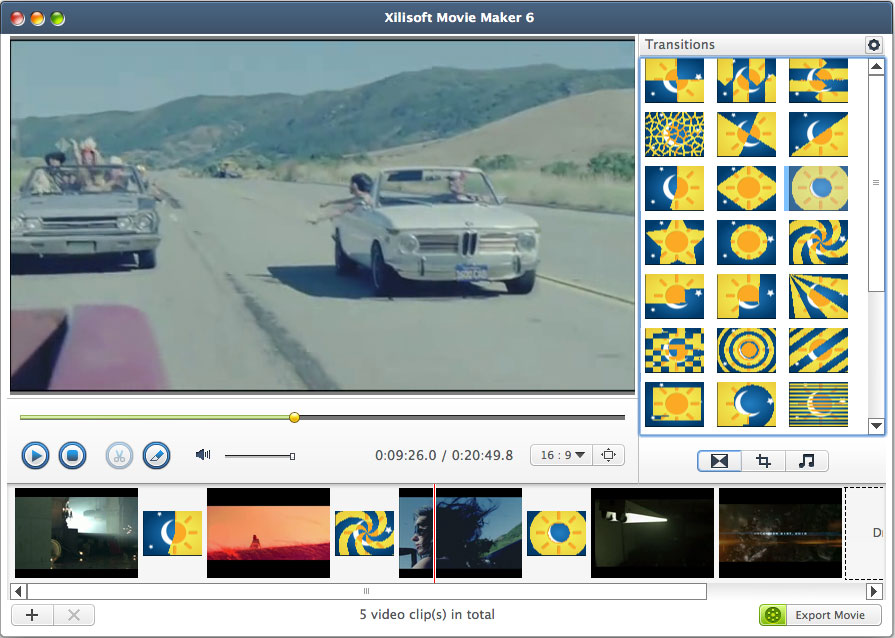
Having trouble making movies on your Mac because of file incompatibility? Xilisoft Movie Maker for Mac makes movie making simple and straightforward. This Mac movie maker helps you make movies from camcorder videos, high-definition (HD) videos and video files in almost any format like MTS, HD AVI, MPEG, MP4, RM, FLV, MOV, WMV and etc.
Xilisoft Movie Maker for Mac is also a powerful Mac movie editor allowing you to add a dozen of transitional effects, also supports random transitions, adjust detailed video parameters, crop video frame, trim videos, and much more.
- Create movies from camcorder/HD/common video files easily and quickly
- Add transitions, special effects, music, narration
- Trim video clips and crop video frame
- Make a movie in minutes without effects added


Safe Download 100% Virus Free

Secure Online Payment

30 Days Money Back Guarantee

Free Customer Service

Customers Also Choose:

Xilisoft iPhone Magic Platinum for Mac
Transfer contents between iPhone and Mac/iTunes. Manage iPhone easily. Convert DVD, CD, videos, audios to iPhone.

Xilisoft Video Converter Ultimate for Mac
Convert common and HD/3D videos in 160+ formats on Mac. Merge, clip and split videos, add video effects, watermark, subtitle, soundtrack, etc.


- Make Movies on Mac with Xilisoft Movie Maker for Mac
Make movies from homemade, HD (incl. HD AVI, HD MPEG-2/4, HD VOB, HD WMV), and popular format videos (incl. AVI, 3GP, MPEG, MP4, RM, FLV, MOV. - Broad Range of Formats Supported for Movie Making
Supports almost all video formats including MTS, M2TS, HD AVI, HD MPEG-2/4, HD VOB, HD WMV, AVI, 3GP, M4V, MPEG, MP4, RM, RMVB, FLV, VOB, MPV, MOV, DAT, ASF, WMV, and many others. - Quick Movie Making
Make a movie in minutes on Mac with the Quick Movie Making functionality.


- Create File Copies while Editing
Save a video copy every time you edit it; each saved copy can be edited separately. - Trim Videos; Extract Segments
Trim video clip and extract the desired segments from it by custom length or duration; output each segment individually or merge them into a new video. - Crop Video Frame
Crop the video image to remove black edges, logos or any other bits that you don't fancy.


- Cool Transitions
Introduce cool transitional effects such as "Slide", "Expand", "Shrink" and so on in between scenes. - Add Music
Add multiple audio tracks to movies including your own voice. - Add Scene Transitions
Xilisoft Movie Maker for mac contains a dozens of transitions such as Arrows Vertical, Clock, Diamond, Double Circle, Ripple, Mosaic and etc you can add to your project.Use cinematic overlays and artistic effects to make your movies look professional - Featured Effects and Video Image Settings
Add artistic effects to movies such as "Old Film", "Mosaic" and "Sand" to give your movies character; adjust video brightness, contrast and saturation. - Full-screen preview
Create an instant and very attractive Movies.Use Full Screen mode to quickly and simply preview the movie you made.


- High-Level Customization
Set general and advanced parameters such as bit rate, frame rate, sample rate, zoom mode, and resolution. Create custom conversion profiles with new parameter settings. - Multi-Skin & Multilingual Interface
Multi-skin and multi-language interface (English, German, French, Spanish, Traditional Chinese, Simplified Chinese, Japanese).
| Output Devices Supported | |
| iPod, iPod nano, iPod classic, iPod shuffle, iPod touch iPhone, iPhone 3G, Apple TV PSP, PS3 Xbox, Xbox 360 Zune Wii, DS General 3GP mobile phone, BlackBerry, etc. General MP4 players: Archos, Creative Zen, iRiver, etc. | |
| Input File Formats Supported | |
| Video | AVI, MPEG, WMV, MP4, FLV, MKV, H.264/MPEG-4, DivX, XviD, MOV, RM, RMVB, M4V, VOB, ASF, 3GP, 3G2, YUV, DAT, MPV, NSV AVCHD Video (*.mts, *.m2ts), H.264/MPEG-4 AVC (*.mp4), MPEG2 HD Video (*.mpg; *.mpeg), MPEG-4 TS HD Video (*.ts), MPEG-2 TS HD Video (*.ts), Quick Time HD Video (*.mov), WMV HD Video (*.xwmv), Audio-Video Interleaved HD Video (*.avi) |
| Audio | MP3, WMA, AAC, WAV, OGG, FLAC, APE, RA, AC3, MP2, AIFF, AU, MPA |
| Output File Formats Supported | |
| Video | AVI, MPEG, WMV, MP4, FLV, H.264/MPEG-4, DivX, XviD, MOV, RMVB, ASF, 3GP, 3G2, SWF, VOB, TS, DV H.264/MPEG-4 AVC (*.mp4), MPEG2 HD Video (*.mpg; *.mpeg), MPEG-4 TS HD Video (*.ts), MPEG-2 TS HD Video (*.ts), Quick Time HD Video (*.mov), WMV HD Video (*.wmv), Audio-Video Interleaved HD Video (*.avi) |
| Processor | Intel® processor |
| OS | Mac OS X v10.6 - 10.14(Mojave) |
| RAM | 512MB RAM |
| Free Hard Disk | 50MB free hard disk space for installation (10GB or more for temporary files) |
| Graphics Card | Super VGA (800×600) resolution, 16-bit graphics card or higher |


