
Xilisoft PowerPoint to DVD Business
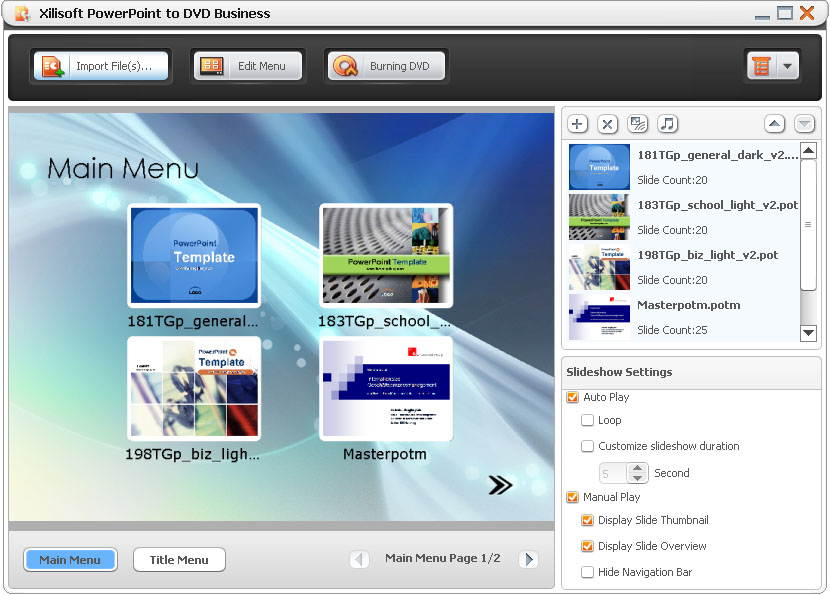
Xilisoft PowerPoint to Home DVD qualifies you to make presentations of your PowerPoint files in Home DVD player. This software is able to convert most formats of PowerPoint (PPT) files to DVD.
Xilisoft PowerPoint to Home DVD enables you to add background music, commentary, picture or watermark, and create a personalized Home DVD menu from menu templates to make customized DVD.
- Convert all formats of PowerPoint (PPT) files into DVD, including ppt, pptx, pptm, ppsx, pps, ppsm, potx, potm and pot formats.
- Create DVD-Video, Home DVD folder or ISO image file from PPT files.
- Customize your PPTs by adding background music, recorded commentary and watermark.
- Create Home DVD menus and add background music/picture.
Which version do you like? Edition Comparison
PowerPoint to DVD Business
$99.95
PowerPoint to DVD Personal
$59.95
Customers Also Choose:

Xilisoft iPhone Magic Platinum
Complete solutions to transfer, backup and manage iPhone/iPad/iPod contents, convert videos and download online videos to iPhone/iPad/iPod.

Xilisoft Video Converter Ultimate
Convert common and HD/3D videos in 160+ formats. Merge, clip, split, add video effects, watermark, subtitle, soundtrack, etc to better enjoy it.


- Convert PPT files to DVD
Convert most PPT formats, including ppt, pptx, pptm, ppsx, pps, ppsm, potx, potm and pot to DVDs. - Create ISO file or DVD Folder
Create ISO file or DVD folders on disk from PPTs. - Support Multiple DVD Formats
Support multiple DVD formats, including DVD-R, DVD+R, DVD-RW, DVD+RW, DVD+R DL, DVD-R DL, DVD-5 and DVD-9.


- Menu Creation and Scores of Templates for Choice
You are free to modify the layout and pattern of DVD menus. Scores of menu templates are also prepared for your choice. - Add Background Music/Picture for Menu
Add your favored music and picture into the menu and you are also able to set the displaying time of the menu. All the modification and design can be previewed in real time. - Skip Menu
Skip Menu option makes the target DVD movie starting directly by hiding the menu panel.

Adding Background Music/Sound Recording/Watermark 
Customize your PPT by adding background music/picture/sound recording/watermark.
- Add Background Music
Make a distinctive PPT by adding beautiful music. You can add a piece of music for the whole PPT and moreover, you can also set different music respectively for each slide of the PPT. - Add Recorded Soundtrack
Add recorded soundtracks to make comments on PPTs during rehearsing. - Add Watermark
You can add watermarks into your file to declare the ownership or illustrate other information. It is also your choice to set the transparency, displaying position, size of the watermarks.

More Presentation Modes and Burning Settings Are At Hand
More presentation modes can be selected to your preference. By setting burning parameters, you are enabled to make your own special DVD.
- Retain Original
Maintain your original elements like video, audio, picture of your PPT after converted to DVD if you are preferred. - Auto-play and Manual-play for Your Option
Set the play mode when playing PPTs in a DVD player as auto-play or manual-play according to your need. In addition, in auto-play mode, playing in loop is available and you can decide the session length between each slide. While in manual-play mode, you can flip slides freely and stop at any slide for further explanation. - Thumbnail List and Outline List on Slides
You can choose to view the slides in thumbnail mode or outline mode to your preference to locate any slide with ease when playing PPTs in a DVD player. Manual-play mode only. - Further DVD Burning Settings
Set the TV standard, aspect ratio and video quality when burning PPTs to DVD. Options like volume label, write speed, copy number of DVD burning are available. - Other Handy Features
More handy features bring you convenience in operation, like post-task actions, background running, multilingual interface and etc.
| Input File Formats Supported | |
| ppt, pptx, pptm, ppsx, pps, ppsm, potx, potm, pot | |
| Audio | AAC, AIFF, AC3, APE, AU, FLAC, MPA, MP2, MP3, MP4, M4A, OGG, RA, RAM, WAV, WMA, AIF |
| Subtitle | SRT |
| Output File Formats Supported | |
| DVD-Video, DVD folder, ISO image file | |
| OS | Microsoft® Windows 11 / 10 / 8 / 7 / Vista / XP (SP2 or later) |
| Processor | 1GHz Intel/AMD processor or above |
| RAM | 256MB RAM (512MB or above recommended) |
| Free Hard Disk | 80MB space for installation (10GB or more for temporary files) |
| Graphics Card | Super VGA (800×600) resolution, 16-bit graphics card or higher |
| Others | Recordable DVD Drive |


