
Xilisoft PowerPoint to Video Converter Business
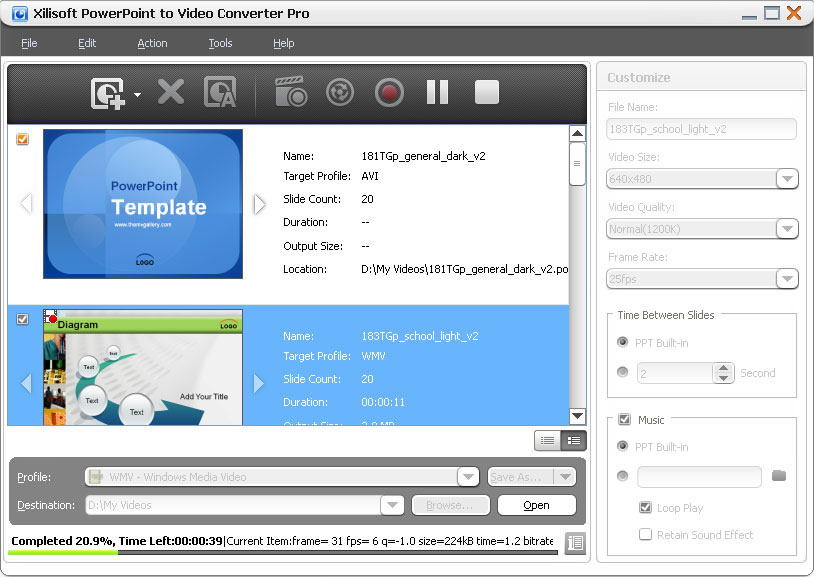
Turn any PowerPoint presentation into video without Microsoft PowerPoint installed. Xilisoft PowerPoint to Video Converter lets you convert PowerPoint presentations (PPTs) to almost all popular SD/HD video formats.
Rehearse and include your own commentary, retain or add background music to your presentation or remove them altogether, adjust the time interval between slides, and add your own logo before converting it to a video.
- Play video presentations on iPad, iPhone, BlackBerry, etc.
- Add commentaries, background music and watermarks.
- Optional "Express Convert" Mode enables PPT to video fast conversions without sound or effect.
PowerPoint to Video Converter Business
PowerPoint to Video Converter Personal
PowerPoint to Video Converter Free
Customers Also Choose:

Xilisoft iPhone Magic Platinum
Complete solutions to transfer, backup and manage iPhone/iPad/iPod contents, convert videos and download online videos to iPhone/iPad/iPod.

Xilisoft Video Converter Ultimate
Convert common and HD/3D videos in 160+ formats. Merge, clip, split, add video effects, watermark, subtitle, soundtrack, etc to better enjoy it.

Play PowerPoint Video on Any Multimedia Player 
Make presentations playable on PC media players, multimedia players or internet browser
- Convert PowerPoint to HD Video
Convert presentations to HD videos like HD AVI, HD H.264/MPEG-4 AVC, HD MPEG 2 TS, HD WMV or HD MOV - Convert PowerPoint to SD Video
Play as AVI, WMV, MP4 or MOV format; no need to install Microsoft PowerPoint. - Convert PowerPoint to Portable Video
Convert presentation to H.264 or MPEG-4 video for playback on iPod, iPhone, PSP and BlackBerry. - Convert PowerPoint to FLV Video
Supports conversion to FLV files, so you can upload and play them on YouTube, Google Video or other video-sharing sites.

Countless Features
Record presentation rehearsal; keep all slide elements; remove music/animation effects
- Record then Convert
Record your PowerPoint presentation with commentary, background music, and even adjust the time interval before converting to video format. - Convert PPT to Video with All Slide Elements Retained/Removed
Convert presentation to video file with all the slide elements such as animations, transitions, sound effects, actions and slide playback interval retained or removed.

Personalized Output Video
Add watermark and change the output parameters to get a personalized PowerPoint video
- Attach Watermark to Your Video
Add your company's trademark to your videos to protect your presentations from being used or distributed illegally. - Change Presentation Parameters
Set slide playback time interval or even add background music to personalize your presentation videos. - Customized Profiles
Change, personalize and save the settings of existing output profiles. - Set Output Parameters
Adjust the resolution, video quality, frame rate and other output parameters to create a custom presentation video.

Preview Option, High Compatibility and Simple Operation
Preview presentation slides, support various input files, and handle the conversion easily
- Preview Slides
Load the presentations and view the slides one by one before converting them to vide format - Wide Compatibility with PowerPoint Versions
Support all presentations (ppt, pptx, pptm, ppsx, pps, ppsm, potx, potm, pot) made by Microsoft PowerPoint XP, 2003, 2007. - Simple to Use
No need to memorize complex codes and terms to convert your presentations. Just load them in Xilisoft PowerPoint to Video Converter Pro and it will do the job for you.
| Output Device Support | |
| iPod, iPhone, PSP, BlackBerry | |
| Input File Format Support | |
| ppt, pptx, pptm, ppsx, pps, ppsm, potx, potm, pot | |
| Output File Format Support | |
| Video | AVI, FLV, H.264/MPEG-4 AVC, MOV, MPEG-2, H.264, MPEG-4, HD AVI, HD H.264/MPEG-4 AVC, HD MOV, HD MPEG-2 TS, HD WMV, HD MOV |
| OS | Microsoft® Windows 11 / 10 / 8 / 7 / Vista / XP (SP2 or later) |
| Processor | 1GHz Intel/AMD processor or above |
| RAM | 512MB RAM (1GB or above recommended) |
| Free Hard Disk | 2GB space or more (50MB space for installation) |
| Graphic Card | Super VGA (800×600) resolution, 16-bit graphics card or higher |
| Others | Windows-compatible (WHQL Certified) sound card recommended; Microsoft PowerPoint XP, 2003, 2007(SP2) |


