
Xilisoft PSP Video Converter
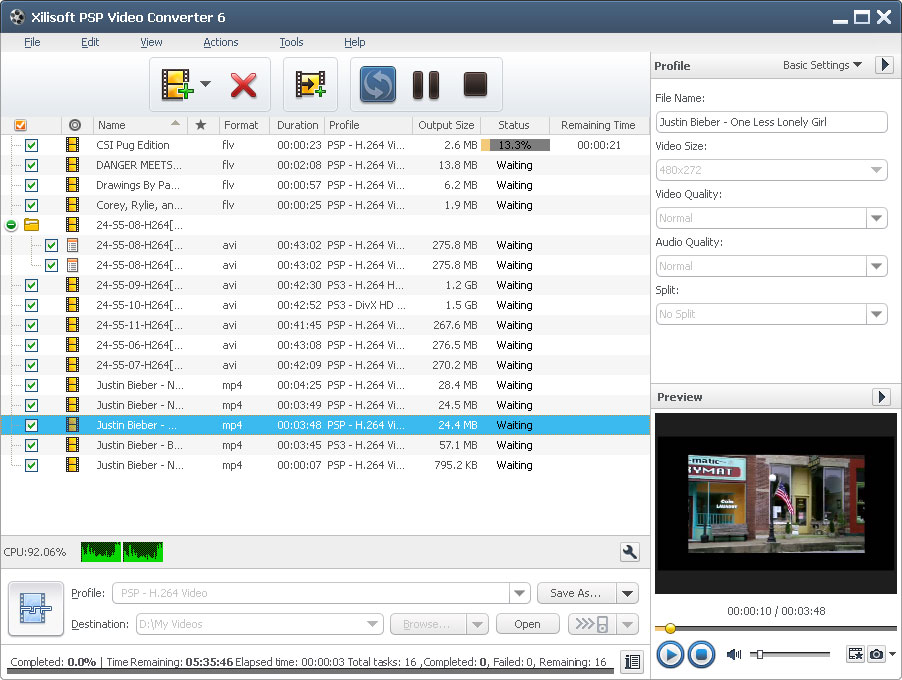
Want to watch movies or videos on your PSP or PS3 while taking a break from playing? Xilisoft PSP Converter transforms and converts your favorite movies and videos in different formats like AVI, MPEG, WMV, MKV, DivX, RM, AVCHD, and H.264/MPEG-4 AVC High-Definition (HD) videos to PSP MPEG-4, PSP AVC, PS3 MPEG-4 (480p, 720p, 1080p) formats.
Try Xilisoft PSP Video Converter now, so your PSP (or PS3) is not only used for playing games, but also for watching movies and videos!
- Supported video formats: AVI, MPEG, WMV and MP4
- Supported audio formats: MP3, WMA, AAC and WAV
- Also supports High Definition (HD) video files
- Supports CD decoding
- Transfer the output to PSP directly
Customers Also Choose:

Xilisoft Video Converter Ultimate
Convert common and HD/3D videos in 160+ formats. Merge, clip, split, add video effects, watermark, subtitle, soundtrack, etc to better enjoy it.

PS3 HD Videos and More 
Convert all video and audio formats to PSP, PS3 video/audio with HD video supporting
- Supports PS3 HD Video Format
The PSP video converter supports converting Audio-Video Interleaved HD Video (*.avi), MPEG2 TS, WMV HD Video (*.xwmv), H.264/MPEG-4 AVC, AVCHD (*.m2ts, *.mts), etc. HD formats to HD PS3 Video (1080P) MPEG-4. - Video to PSP/PS3 Video and Audio
Supported video formats: AVI, MPEG, WMV, DivX, MP4, RM, MOV, M4V, XviD, 3GP, VOB, FLV, MP2, MP3, WEA, WAV, RA, M4A and more.
Supported audio formats: MP3, M4A, WMA, or WAV. - Video to PSP Transfer
Enable you to convert various video format files and transfer them to PSP in one click. - Speedy Conversion
Detects and supports dual-core or multi-core CPU, meaning it converts faster if CPU cores are higher. - Best Resolution with Thumbnail
Convert to highest PSP resolution 480x272; you can choose to display video thumbnail on PSP by generating a THM file during video conversion.


- Customize Output Audio and Video Formats
After choosing output file formats, you can also choose audio quality, video quality and other file parameters before converting . - Several Outputs from One File
From one single file, you can convert to several different file formats simultaneously. - Convert a Segment and Convert
If you only want a certain clip from a video, you can just set the start and end time of the certain clip then click convert. - Adjustable File Size
Before converting , you can input your desired file size (bigger or smaller) in the bit rate calculator, and it will do the calculating and setting for you. - Splitting Files
Split a file into several small ones by setting the file size or file duration to split; it will automatically split once the split time or size is reached.


- Preview and Snapshot
Allows you to preview the video files in the built-in resizable player (supports 4:3 and 16:9 zoom mode), and take a snapshot of a certain favorite scene and save as JPEG, PNG, GIF or BMP file. - Batch Conversion and Multithreading
With multithread converting technology, conversion is faster, and even quicker if you convert several files in batches simultaneously. - Skin and Language
You can choose from an array of skins available. Change the language to English, German, Chinese, French, Spanish or Japanese. - Power Management
Allows you to manage your system power in this PSP video converter. - Run in Background
You can run the converter in the background while you do other tasks. - Set Post-Conversion Action
Set an action (shutdown, hibernate, exit or standby) to perform automatically after the conversion to avoid waiting.
| Input File Format Support | |
| Video | AVI, MPEG, WMV, MP4, FLV, MKV, H.264/MPEG-4, DivX, XviD, MOV, RM, RMVB, M4V, VOB, ASF, 3GP, 3G2, SWF, H.261, H.264, DV, DIF, MJPG, MJPEG, DVR-MS, NUT, QT, YUV, DAT, MPV, NSV AVCHD Video (*.mts, *.m2ts), H.264/MPEG-4 AVC (*.mp4), MPEG2 HD Video (*.mpg; *.mpeg), MPEG-4 TS HD Video (*.ts), MPEG-2 TS HD Video (*.ts), Quick Time HD Video (*.mov), WMV HD Video (*.xwmv), Audio-Video Interleaved HD Video (*.avi) |
| Audio | MP3, WMA, AAC, WAV, CDA, OGG, FLAC, APE, CUE, M4A, RA, RAM, AC3, MP2, AIFF, AU, MPA, SUN AU Format |
| Output File Format Support | |
| Video | MPEG, MP4, MPEG-4, H.264/MPEG-4 AVC |
| Audio | MP3, WMA, WAV, M4A |
| Image | BMP, GIF, JPEG, PNG |
| Output Device Support | |
| iPod touch 5, iPod nano 7, iPad mini, iPad mini with Retina display, iPad 4, iPhone 5 PSP, PSP Go, PS3, PS3 Slim Android mobile devices: Samsung Galaxy Note II (n7100), Samsung Galaxy S III (i9300), Samsung Galaxy S II (i9100), LG Optimus 4X HD (P880), LG Optimus 2X (P990), HTC DROID DNA (X920), HTC EVO 4G LTE (ONE X), HTC ONE V, Motorola DROID RAZR MAXX HD, Motorola Photon Q ,Sony Xperia TL (LT30), Sony Xperia S (LT26), Sony Xperia P (LT22) Google mobile devices: Google Nexus 4 Windows mobile devices: Nokia Lumia 920, Nokia Lumia 820, HTC Windows Phone 8X, HTC Radar 4G, Samsung Focus S | |
| OS | Microsoft® Windows 11 / 10 / 8 / 7 / Vista / XP (SP2 or later) |
| Processor | 1GHz Intel/AMD processor or above |
| RAM | 256MB RAM (512MB or above recommended) |
| Free Hard Disk | 100MB space for installation |
| Graphic Card | Super VGA (800×600) resolution, 16-bit graphics card or higher |


