
Xilisoft Video Editor for Mac
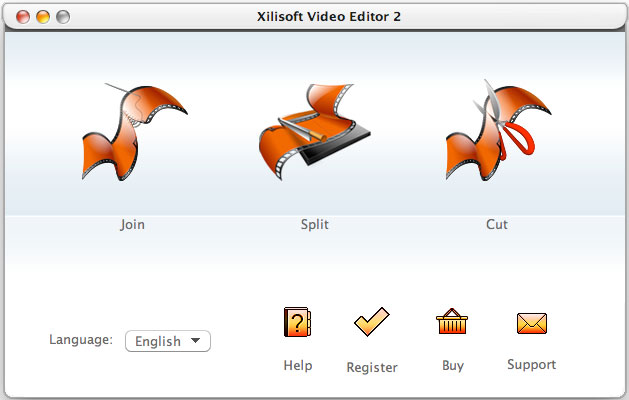
Xilisoft Video Editor for Mac is comprehensive and easy to take your video footage from shoot to show as your wish on Mac.
Quickly load, organize and trim SD or HD video clips, cut together your production or split to segments to get creative and customized brand new videos. This video editing software for Mac supports almost all popular video formats including AVI, MPEG, WMV, MP4, FLV, MKV, H.264/MPEG-4, DivX, MOV, 3GP, etc.
- Join several videos together to create your own movies
- Instantly split your video into parts by the standard you defined
- Easily remove unwanted parts of your video in one simple step
- Clear timeline to edit on track, add transitions and adjust parameters to perfect output
- Export videos to HD and any other standard video formats
- Fastest way to edit videos with simple and intuitive interface


Safe Download 100% Virus Free

Secure Online Payment

30 Days Money Back Guarantee

Free Customer Service

Customers Also Choose:

Xilisoft iPhone Magic Platinum for Mac
Transfer contents between iPhone and Mac/iTunes. Manage iPhone easily. Convert DVD, CD, videos, audios to iPhone.

Xilisoft Video Converter Ultimate for Mac
Convert common and HD/3D videos in 160+ formats on Mac. Merge, clip and split videos, add video effects, watermark, subtitle, soundtrack, etc.

Your Complete Video-editing Package for Mac 
A great combination of video Joiner, Video Splitter and Video Cutter for Mac users
- Seamless Join Videos Together
Seamless join videos together, even videos of different formats. - Instantly Split Videos into Segments
Instantly split videos into segments to fit your digital devices. - Easily Clip Videos to Retain Wanted Parts
With Xilisoft Video Editor for Mac, you can easily remove unwanted parts of your video in one simple step to showcase your favorite footage. - Support a Vast Range of Video Formats
A vast range of video formats are supported, including AVI, MPEG, WMV, MP4, FLV, MKV, H.264/MPEG-4, DivX, XviD, MOV, RMVB, ASF, 3GP, 3G2, SWF, VOB, TS, DV
H.264/MPEG-4 AVC (*.mp4), MPEG2 HD Video (*.mpg; *.mpeg), MPEG-4 TS HD Video (*.ts), MPEG-2 TS HD Video (*.ts), Quick Time HD Video (*.mov), WMV HD Video (*.wmv), Audio-Video Interleaved HD Video (*.avi).

Get Creative and Bring Personalized Videos to Home
Add transitions and adjust parameters to perfect output, export output to HD videos, output all segments to a new movie and etc. 
- Apply Transitional Effect
Apply fade-in or fade-out effect when joining video clips to put them together seamlessly. - Easy HD Output
Quickly export video output to High Definition videos to have a better enjoyment. - Multi-trim Videos to Whole
Easily trim multiple video clips you like and output them to a whole new movie. - Advanced Video Editing for Mac
Have fun making movies with professional video-editing parameters, like video size, bitrate, frame rate, zoom and etc.

Simple Steps to Great-looking Movies
Split video to parts automatically according to defined standard, clear timeline to set cut points, friendly interface and etc.
- Automatic Splitting
Split video to parts automatically according to defined standard: video size, video duration or video segment numbers. - Clear Timeline
Clear timeline to set start point and end point accurately and easily. - 1-2-3 Interface
Sstart editing videos faster with the simple and intuitive interface. - Multilingual Interface
English, German, Spanish, French, Italian, Japanese, Simplified and Traditional Chinese interface languages are optional.
| Input Video Formats Supported | |
| AVI, MPEG, WMV, MP4, FLV, MKV, H.264/MPEG-4, DivX, XviD, MOV, RM, RMVB, M4V, VOB, ASF, 3GP, 3G2, SWF, H.261, H.264, DV, DIF, MJPG, MJPEG, DVR-MS, NUT, QT, YUV, DAT, MPV, NSV AVCHD Video (*.mts, *.m2ts), H.264/MPEG-4 AVC (*.mp4), MPEG2 HD Video (*.mpg; *.mpeg), MPEG-4 TS HD Video (*.ts), MPEG-2 TS HD Video (*.ts), Quick Time HD Video (*.mov), WMV HD Video (*.xwmv), Audio-Video Interleaved HD Video (*.avi) | |
| Output Video Formats Supported | |
| AVI, MPEG, WMV, MP4, FLV, MKV, H.264/MPEG-4, DivX, XviD, MOV, RMVB, ASF, 3GP, 3G2, SWF, VOB, TS, DV | |
| H.264/MPEG-4 AVC (*.mp4), MPEG2 HD Video (*.mpg; *.mpeg), MPEG-4 TS HD Video (*.ts), MPEG-2 TS HD Video (*.ts), Quick Time HD Video (*.mov), WMV HD Video (*.wmv), Audio-Video Interleaved HD Video (*.avi) |
| OS | 32 bit: Mac OS X v10.6 - 10.14(Mojave) 64 bit: Mac OS X v10.9 - macOS Sequoia (Version 15) |
| Processor | Intel® processor |
| RAM | 512MB RAM |
| Free Hard Disk | 150MB free hard disk space for installation (10GB or more for temporary files) |
| Graphics Card | Super VGA (800×600) resolution, 16-bit graphics card or higher |


