
Xilisoft YouTube to iPod Converter
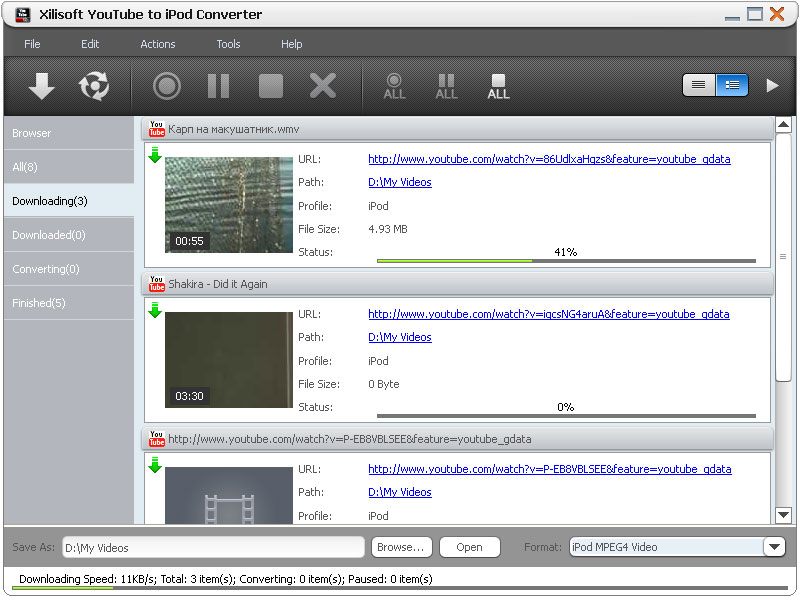
Want to watch YouTube videos on your iPod or iPhone offline? Xilisoft YouTube to iPod Converter allows you to download YouTube videos (FLV) and convert them to iPod/iPhone (MP4) format at lightning speed. This program also supports YouTube HD video files.
There are many easy and simple ways to download YouTube Videos. Drag and drop YouTube video URLs on the window of the converter to start downloading. Another way is to use the right-click menu on your Internet Explorer (IE) browser, or just browse and by using the built-in YouTube browser. This "download + convert" software allows you the easiest and fastest way to watch, download and transfer videos to your multimedia device!
- Download and convert YouTube videos for iPod or iPhone (even the newest iPhone 4)
- Supports HD format videos
- Download videos as YouTube FLV files
- Simple and easy to use interface


Safe Download 100% Virus Free

Secure Online Payment

30 Days Money Back Guarantee

Free Customer Service


Download + Convert YouTube to iPod/iPhone videos 
Batch download and convert YouTube videos for your iPod or iPhone
- Download and Convert in One Step
You need not wait or change programs just to download and then convert, with Xilisoft YouTube to iPod converter, download and convert is done in one step. - YouTube FLV and HD Formats Supported
The converter not only supports original YouTube FLV files, but also HD formats. - Work with Multiple Tasks
Queue as many tasks and let the software do the downloading and converting with just one click.

Different Ways to Download YouTube videos
Download via built-in browser, IE right-click menu option, proxy server, or drag and drop
- Drag and Drop to Start Downloading
Just drag the YouTube URL to the main window of the program to start downloading. - Internet Explorer (IE) Right-Click Feature
With Xilisoft YouTube to iPod Converter installed, the download function is immediately found on IE browser's right-click menu. - Download by Proxy Server
Convert videos from YouTube anonymously through proxy server. - Built-In Browser
Browse and download videos with the built-in YouTube browser. The built-in browser even lists videos by categories, popularity, or interestingness for easier browsing.

Flexible Settings and Fast Download Speed
Numerous features to give you a faster and easier YouTube to iPod conversion
- Prompt After Conversion
You could set the after-action (shut down, hibernate, standby and exit program) before starting so you could leave the computer and do its job. - Endless Possibilities and Options
Choose the file properties to be displayed as columns in the file list; view tasks in table or icon list and sort tasks by title, file size, output format, status and so on; view the information of downloaded files; choose interface language and skin.
| Output Device Support | |
| iPod, iPod nano, iPod classic, iPod touch, iPod touch 4 iPhone, iPhone 3G, iPhone 3GS, iPhone 4 iPad | |
| Input File Format Support | |
| YouTube FLV video | |
| Output File Format Support | |
| Video | MPEG-4, MP4, FLV |
| OS | Microsoft® Windows 11 / 10 / 8 / 7 / Vista / XP (SP2 or later) |
| Processor | 1GHz Intel/AMD processor or above |
| RAM | 256MB RAM (512MB or above recommended) |
| Free Hard Disk | 30MB space for installation |
| Graphic Card | Super VGA (800×600) resolution, 16-bit graphics card or higher |
| Others | Internet connection |


