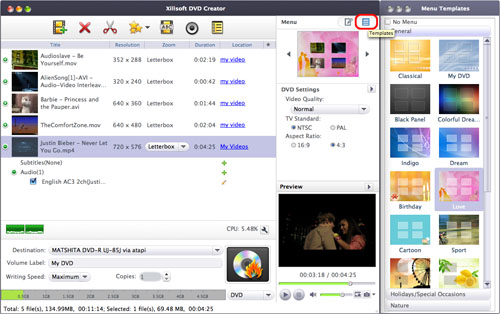
Xilisoft DVD Creator for Mac is an easy-to-use Mac DVD creator and Mac DVD burner program which can help Mac users convert M4V files to DVD format and burn M4V files to DVD disc directly. It can not only convert and burn M4V to DVD, but also convert and burn other popular video formats such as AVI, MPEG, WMV, 3GP, MP4, etc. to DVD.
If you are Windows user, please visit: Xilisoft DVD Creator for Windows.
Step 1: Download the DVD Creator for Mac (Please choose Intel Version or PowerPC Version) and install it.
Step 2: Insert a DVD disc.
Insert a blank or rewritable disc into your recordable drive: DVD-5 or DVD-9.
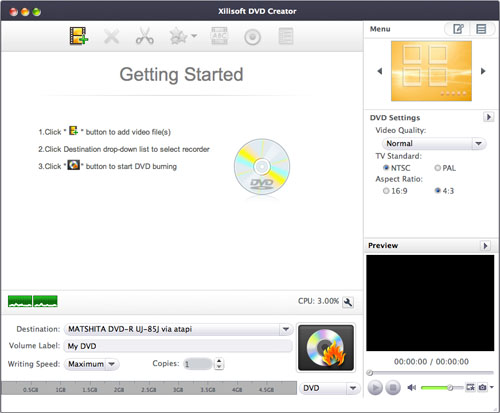
Step 3: Load M4V files.
Click "Load Video Files" button to load your M4V files.
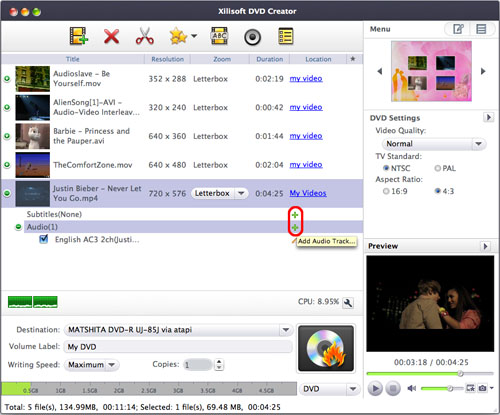
Step 4: Set output display method.
Three options for you to choose:
- Letterbox: add black stripes to fit the output aspect ratio.
- Pan and Scan: crop frame to fit the output aspect ratio.
- Full Screen: stretch and compress frame to fit the output aspect ratio.
Step 5: Make DVD menu.
Click "Template" to choose menu you like. Edit "Background Music", "Background picture" and "Menu Topic".
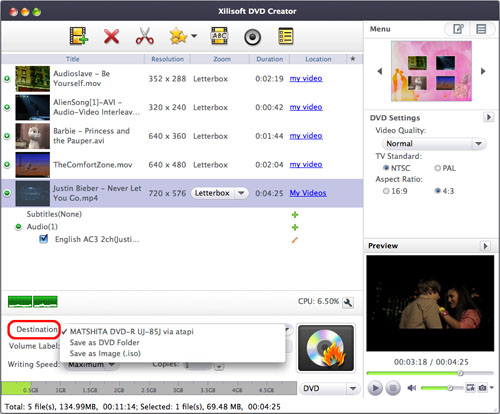
Step 6: Choose Destination.
You can choose to convert and burn M4V files to DVD disc directly or convert M4V to DVD folder and ISO files.
Step 7: More settings.
Step 8: Click "Start Burn" to convert and burn M4V to DVD.
Ok, done.
If you're interested in this program, please visit: Xilisoft DVD Creator for Mac.
You may also be interested in...
Knowledge Base
- put DVD on iPod?
- convert DVD to MP3 for iPod?
- transfer music from iPod to computer?
- copy songs from iPod to Mac computer?
- convert DivX to iPod?
- convert MPEG to iPod?
- convert 3GP to iPhone on Mac
- convert ASF to iPhone on Mac
- teach you transfer iPhone video freely
- manage iPhone file?
- create your own free iPhone ringtone?
- convert FLV to iPhone?
- transfer files from PC to your iPhone?
- transfer iPhone music?
- make ringtone for iPhone for free?
- backup iPhone music to your computer?
- convert MOV to iPhone on Mac
- convert AVI to iPhone on Mac
- convert WMV to iPhone on Mac?
- make free ringtone for iPhone on Mac?
- convert WMV to PSP?
- put DVD onto PSP?
- convert FLV to PSP?
- convert video files to PSP?
- Convert and transfer video to PSP
- put videos on Zune?
- convert FLV to Zune?
- convert HD video to Apple TV?
- 5 Tips to Make Successful Video Conversion
- convert M4V to AVI?
- convert MOV to AVI?
- convert RM to MP4?
- convert RM to WMV?
- convert WMV to AVI?
- convert AVI to 3GP?
- convert AVI to MP4?
- convert M4A to MP3?
- convert FLV to AVI?
- convert MKV files?
- convert FLV to AVI?
- convert M4V to FLV?
- convert SWF to MP4?
- convert video to XBox?
- convert video to DGP?
- convert MKV to 3GP?
- convert RM to AVI?
- convert WMV to FLV?
- convert RM to 3GP?
- convert video to GIF?
- convert MKV to AVI, MKV to MPEG?
- convert HD to SD video?
- Top DVD ripper review
- Why use DVD Ripper?
- Fast rip DVD to video?
- convert DVD to QuickTime?
- convert DVD movie to MP4?
- rip DVD in Windows Vista?
- burn AVI to DVD?
- convert AVI to DVD?
- convert and burn M4V to DVD?
- burn video files to DVD?
- convert DivX to DVD?
- burn ISO to CD/DVD?
- save YouTube videos on computer free?
- convert YouTube video to iPod?
- convert YouTube to other videos?
- convert YouTube to MOV?
- convert FLV to 3GP?
- convert FLV to MOV?
- convert FLV to MP4?
- convert AAC to MP3?
- convert CD to MP3?
- convert WAV to MP3?
- convert DVD to MP3?