
5 Tips to Make Successful Video Conversion
This digital video age is full of various video formats. Video format list shows 166 different video formats, which is just the tip of the iceberg. Since developing new proprietary video formats has become the trump card for some software or hardware vendors, the video format list will grow fast and never stop.
You may have encountered some of the following problems:
- The video won’t play when you make an important presentation before your boss or clients;
- You download some funny YouTube clips, but PSP shows “invalid format” when you show off to your friends;
- Someone emails you a video attachment that you can’t watch;
You must feel like ants in one's pants in those embarrassments. In this article, we will provide five useful tips about how to make successful video conversion. For those who don't have a lot of time to learn the intricacies of video conversion, but want an easy way to produce good looking video, this article may well suit you.
Tip 1 – Understand Some Basic Knowledge.
A thick tedious book full of abstruse scientific terms is needed to know what each video format means and the details how various video formats are created. But we don’t have to be a scientist in order to make a video conversion, some basic knowledge is enough.
Most video files have at least two different types: the container, and the codec.
- A container format is a computer file format that can contain various types of data, compressed in a manner of standardized codecs. The container describes the structure of the file: where the various pieces are stored, how they are interleaved, and which codecs are used by which pieces. It may also specify an audio codec as well as video.
- Codec, short for compressor/decompressor, allows you to store the digital music, photos, and movies in the form of compact, manageable files, which can then be opened or decompressed to deliver the original contents. The common video codecs include DivX, XviD, 3ivx, MPEG(MPEG-1,2,3,4), ReadVideo.
A video can be thought of as being made up of numerous snapshots, called frames. Frame rate is the number of still pictures per unit of time of video, and most often expressed in frames per second (fps). Motion pictures shot on film do so at 24 FPS. Both video and audio file resolution is measured in kilobytes per second (kbps) — that is, how many thousands of bytes it takes to store one second of sound or videos. This figure is known as the bitrate. A higher bitrate allows better video quality.
Aspect ratio describes the dimensions of video screens and video picture elements. All popular video formats are rectilinear, and so can be described by a ratio between width and height. The screen aspect ratio of a traditional television screen is 4:3, or about 1.33:1. High definition televisions use an aspect ratio of 16:9, or about 1.78:1. The aspect ratio of a full 35 mm film frame with soundtrack (also known as the Academy ratio) is 1.375:1.
Video is made up of static pictures being flashed before us in rapid succession. When we talk about picture resolution we are referring to the elements, pixels, which make up the pictures. For example, iPod classic video is 320*240.
Finally, theoretically video conversion won’t improve video quality. You shall not expect better quality than source video.
Tip 2 - Find and Buy One Good Video Converter.
A good video converter is vital to whether you can successfully finish video conversion.
There are tons of available video converter applications. Good video conversion software can make you look like a video whiz with minimal effort. Since most video converters are trialware, you can try before purchasing.
We summarize four criteria when evaluating video converter software:
- Input Files- It should accept a wide variety of input files especially your source video formats.
- Output Files- You may only need to output to a handful of formats, whereas the number and breadth of output files typically determines the strength of the converter’s overall performance.
- Features- The features includes the ability to adjust multiple options including video size, codecs, bitrates and frame rates, to ensure high quality. You may think those features are reserved for advanced users, not to a video rookie, but as we introduce below, a broad feature set which is readily available and easy to find is also important to your conversion success.
- Ease of Use- The software interface should be intuitive and non-threatening to the novice user. Most video conversion tasks should be done in several clicks.
With a good video converter, you are close to success.
Tip 3 – Make Appropriate Setting.
A lot of the ugly-looking grainy clips you see online are the victims of bad conversion practices. Poorly encoded or converted video can end up looking horrible, which is an eye torture.
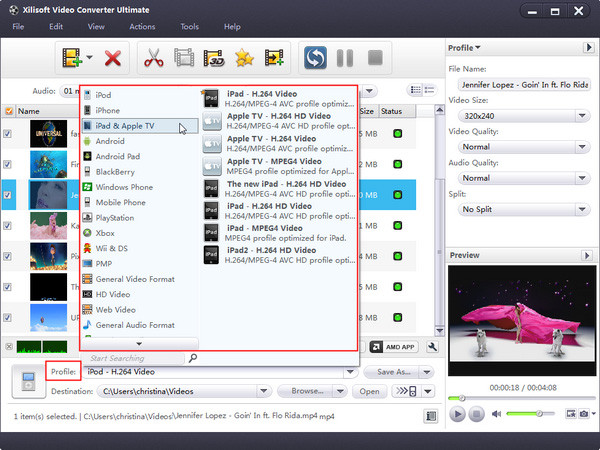
To avoid this, you need to make sure you take the correct output settings. Some video converters have provided some convenient way to optimize the output. In Xilisoft Video Converter, there are various preset optimized profiles which can be used to fit diverse multimedia devices.
Those preloaded profiles cover most our requirements. But you can still modify some parameters according to your specialized requirements. As introduced in Tip 1, you can customize the frame rate, bitrate, video size, aspect ratio, etc., to get best result. For example, you can increase the value of video/audio bitrate to get a higher image/sound quality and for a compressed file you can decrease the value. You can save the customized profile for handier usage and quicker access in the future.
Tip 4 – Editing Video in Your Way.
Stop thinking video editing requires professional expertise and only Hollywood geek could do it. Most video converters allow you to add a wide variety of eye–popping effects to your videos. You can clip, crop, apply visual effects, and add background music, subtitle and watermark to personalize your movies, transform it into a work of art. Good video converter tool usually provides detailed help information which is easy to understand. Feel free to try out the available editing functions then you will master them.

Tip 5 –Practice More and Share with Others.
The best way to sharpen your video conversion skill is through practice.
You may explore the video converter with different setting and apply more effects. In addition, though understanding everything about video formats just isn’t an option for most, knowing more knowledge will make your video conversion job better. You might want to take a look at some video knowledge websites like Videohelp.com, Ars Technica and Video Forums. You can share your experience with others and also learn some advanced skills from other people. You may also publish you videos on some websites to show off your accomplishments.
Enjoy your video conversion!


