
How to convert WMA to MP3
How to change WMA file to MP3 file? How to convert WMA into MP3? Xilisoft WMA MP3 converter can do this. It can convert MP4, M4A, MP2, WAV, MP3, WMA, OGG, AAC, FLAC, APE, VQF etc. to the most popular audio formats MP3, WMA and MP2. The software is also able to extract audio tracks from video formats like AVI, MPEG, WMV and ASF and save them as MP3, MP2 or WMA format. Please free download and follow me step by step to convert WAM to MP3.
Features of Xilisoft Audio Converter
- It supports copy ID3 tag between formats, so you can easily transfer all of the most useful tag fields from one format to another.
- It supports batch conversion-- You can select all files you want to convert and Xilisoft WMA MP3 Converter will automatically convert them one by one.
- Choose output path-- Users are able to edit the output path or use the same one as the input path.
- Default and selected settings--When you convert your files, bitrate, VBR or CBR, stereo or mono etc can be selected or you can just keep the default settings to get the best output quality etc..
The belowed tips will tell you how to step by step convert audio files with the powerful Xilisoft Audio Converter.
1. Free download the simple-to-use Xilisoft Audio Converter, install and launch.
2. Use "Add" button on the main window or "Add" in the "File" menu to select your original file first, and then open the folder where your original files are located, all supported files will be listed automatically. 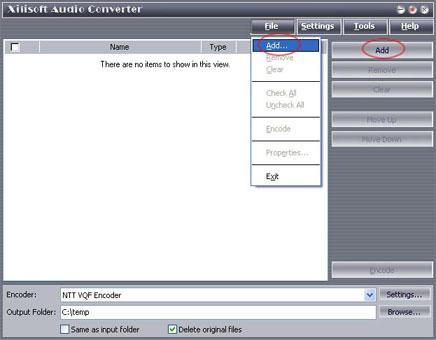
3. Select a file or several files. The file(s) you highlighted will be loaded after you click "Open". 

4. Use "Remove" button to remove the loaded file which you highlight; "Clear" button to clear all the files you selected. Those buttons can also be found in the "File" menu.
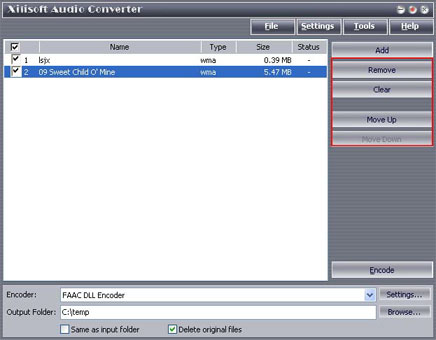
5. Select target file format that you want to output. Highlight your loaded file first and then select output format from "En-coder" combo-box. For example, if you want to convert original audio file to MP3 format, you should select "Lame MP3 En-coder".

6. To set the folder that you want to save your target file, you may select the Output folder by clicking "Browse..." button or directly enter a path in the "Destination" box. "C:temp" is set as the default destination folder.

7. You can adjust some special setting for your conversion by clicking "Settings" behind the "Encoder" combo-box, such as "Bit Rate" and "Sample Rate".
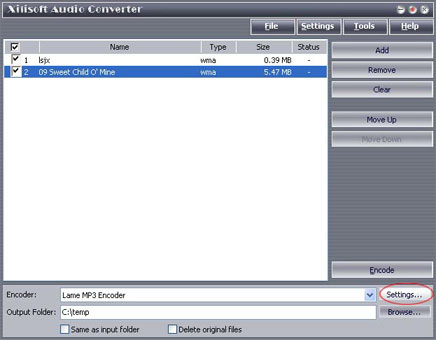
8. As the last step, just click "Encode" to start your conversion. You can see "OK" under the "Status" column which means you got a successful conversion. What to do now? Just enjoy your music. Our software keeps the quality as good as the original files.


