
How to Convert RMVB to AVI?
Do you have a question how to play RMVB files if your player does not support the format? Xilisoft Video Converter can help you convert the RMVB files to AVI or other formats. It is a complete video converter and editor. It can convert between SD/HD/3D videos and audio formats such as MP4, MOV, 3GP, MKV, TS, H. 264, M4A, FLV, MP3, AC3, etc. Now you can convert video, audio, and animated images to play on your PSP, PS3, iPad, iPhone, Apple TV, Xbox, Google phones, and other digital multimedia devices.
And also, you can use it to edit videos, clip/merge/split files, add watermarks/subtitles/soundtracks, etc. It supports batch conversion, multithreading, providing 5X faster speed to save your time. When converting RMVB to AVI, you can select the video and audio codec, set the output parameters, etc. Now free downlaod to have a trial.
Here is the guide for how to convert RMVB to AVI with this professional video converter.
1. Start up Xilisoft Video Converter
2. Select the target to decode
3. Set advanced parameters
4. Choose the destination
5. Start the RMVB to AVI conversion
1. Start up Xilisoft Video Converter
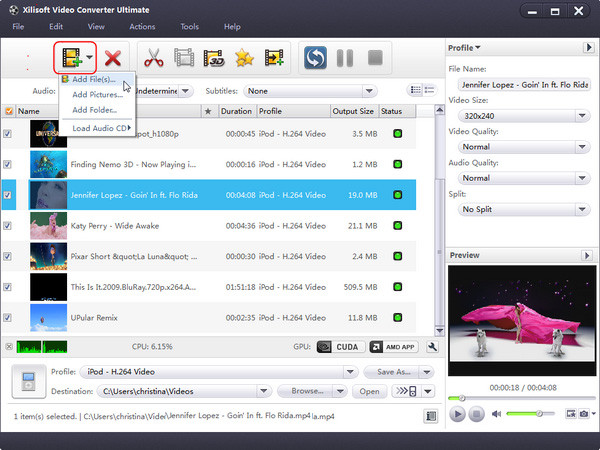
Free download Xilisoft Video Converter, install and launch it. Then add your RMVB file by clicking "Add" in the File menu or in the main interface.
2. Select the target to decode
By highlighting the RMVB file, you can see its info including video codec and audio codec in the recording area.
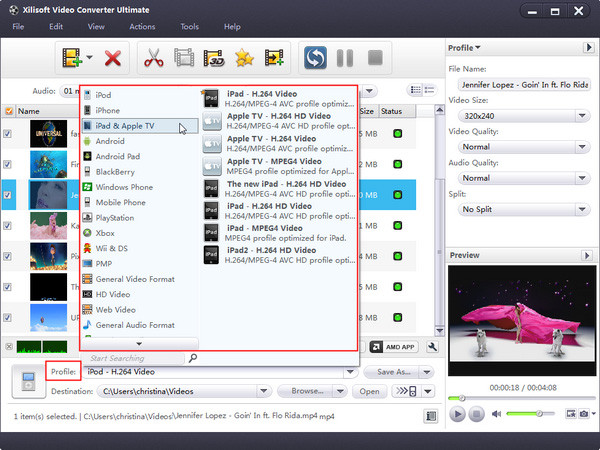
In "Profile" drop down list box, you may select output format. The software allows setting different output formats according to different files. For example, I may set the AVI as output format of the RMVB file.
3. Set advanced parameters
After selecting certain output format, the right column will show its general standard. By clicking certain settings such as "Start Time", "Video Size", "Video/Audio Bit rate" and so on, you may set it.

4. Choose the destination
Now let's select the output folder by clicking the "Browse..." button or directly enter a path in "Destination" drop down list box.
5. Start the RMVB to AVI conversion
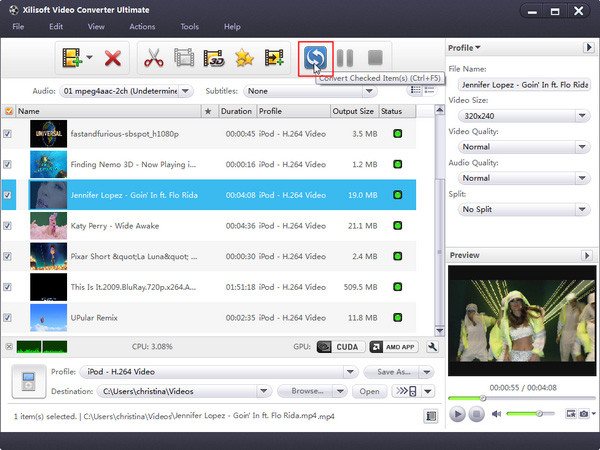
Finally, click "Convert" in the File menu. After a successful conversion, the info "Completed" will show.
If you're interested in this RMVB AVI video converter program, please visit: Xilisoft Video Converter.


