How to convert videos to iPod?
How to convert video files using this video converter? The following will show you a step by step guide to complete the conversion task. Download, install and run Xilisoft iPod Video Converter (Windows and Mac) first.
Step 1: Add File
Click ""Add File"" button on the toolbar or ""File > Add File"" to load files.
Step 2: Choose output format
Choose the file, click ""Profile"" drop-down button to choose the formats you need, then click ""Browse"" button to choose destination folder for saving output files.
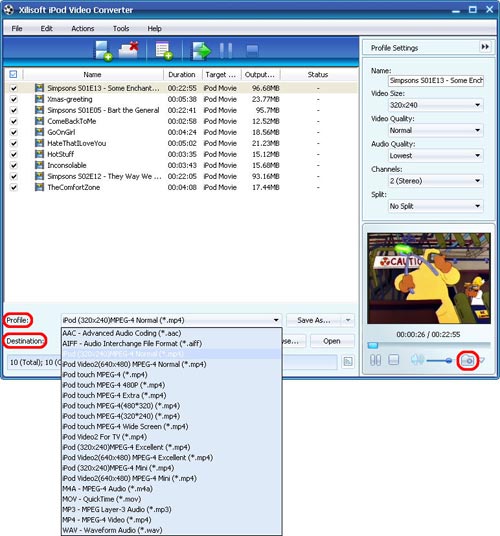
Tip1: Click ""Snapshot"" button on main interface to take a snapshot when playing the video and save them as BMP.
Tip2: If you want to do more with your video and audio files, please refer to the ""More usage skills"".
Step 3: Convert
After choosing the format, you only need to click ""Convert"" button on the toolbar to complete the task.
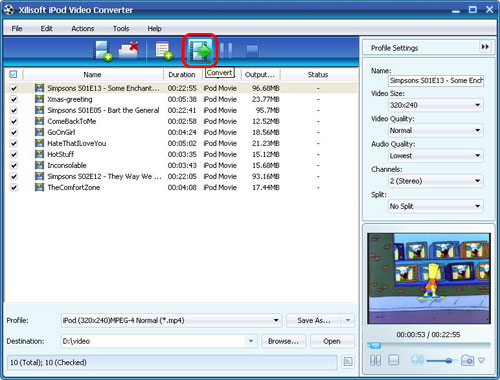
Ok, the above is the easiest function for your conversion.
If you use it for once or more you will find it is easy for you to do any complex convertion as your wish if you want more information you can stick with :
http://www.xilisoft.com/ipod-video-converter.html
If you want to convert any video to your ipod but your system is Mac OS and you still can choose Xilisoft iPod Video Converter for Mac , here is more information for you :
http://www.xilisoft.com/video-converter-mac.html
You may also be interested in...
Knowledge Base
- put videos to iPod
- put DVD on iPod?
- convert DVD to MP3 for iPod?
- transfer music from iPod to computer?
- copy songs from iPod to Mac computer?
- convert DivX to iPod?
- convert MPEG to iPod?
- convert 3GP to iPhone on Mac
- convert ASF to iPhone on Mac
- teach you transfer iPhone video freely
- manage iPhone file?
- create your own free iPhone ringtone?
- convert FLV to iPhone?
- transfer files from PC to your iPhone?
- transfer iPhone music?
- make ringtone for iPhone for free?
- backup iPhone music to your computer?
- convert MOV to iPhone on Mac
- convert AVI to iPhone on Mac
- convert WMV to iPhone on Mac?
- make free ringtone for iPhone on Mac?
- convert WMV to PSP?
- put DVD onto PSP?
- convert FLV to PSP?
- convert video files to PSP?
- Convert and transfer video to PSP
- put videos on Zune?
- convert FLV to Zune?
- convert HD video to Apple TV?
- 5 Tips to Make Successful Video Conversion
- convert M4V to AVI?
- convert MOV to AVI?
- convert RM to MP4?
- convert RM to WMV?
- convert WMV to AVI?
- convert AVI to 3GP?
- convert AVI to MP4?
- convert M4A to MP3?
- convert FLV to AVI?
- convert MKV files?
- convert FLV to AVI?
- convert M4V to FLV?
- convert SWF to MP4?
- convert video to XBox?
- convert video to DGP?
- convert MKV to 3GP?
- convert RM to AVI?
- convert WMV to FLV?
- convert RM to 3GP?
- convert video to GIF?
- convert MKV to AVI, MKV to MPEG?
- convert HD to SD video?
- Top DVD ripper review
- Why use DVD Ripper?
- Fast rip DVD to video?
- convert DVD to QuickTime?
- convert DVD movie to MP4?
- rip DVD in Windows Vista?
- burn AVI to DVD?
- convert AVI to DVD?
- convert and burn M4V to DVD?
- burn video files to DVD?
- convert DivX to DVD?
- burn ISO to CD/DVD?
- save YouTube videos on computer free?
- convert YouTube video to iPod?
- convert YouTube to other videos?
- convert YouTube to MOV?
- convert FLV to 3GP?
- convert FLV to MOV?
- convert FLV to MP4?
- convert AAC to MP3?
- convert CD to MP3?
- convert WAV to MP3?
- convert DVD to MP3?
