How to split videos from moives with Video Splitter on Mac?
Jan 11, 2013 Posted by Sandy Young to Tips
How to split videos from moives with Video Splitter on Mac?
If you have some MP4/AVI/MPEG video files that are too long, and then you want to break up. Now you can actually split them easily. You will need to use a video splitter program to do the split.
Xilisoft Video Splitter for Mac is the next-generation device when it comes to video splitting. Sleek and simple, this great programme allows the user to split videos at will with dozens of customizable options and features. It is an easy to use program that allows you to split MP4/AVI/MPEG video files with ease.
How to split videos from moives on mac?Download Video Splitter for Mac(for free) and start the tutorial!
Also Windows Version is available too:Video Splitter for Win(for free)!1.Install Video Cutter for Mac and lauch it.
2.Load File
Load the moive or video you want to cut by clicking the icon "Folder"
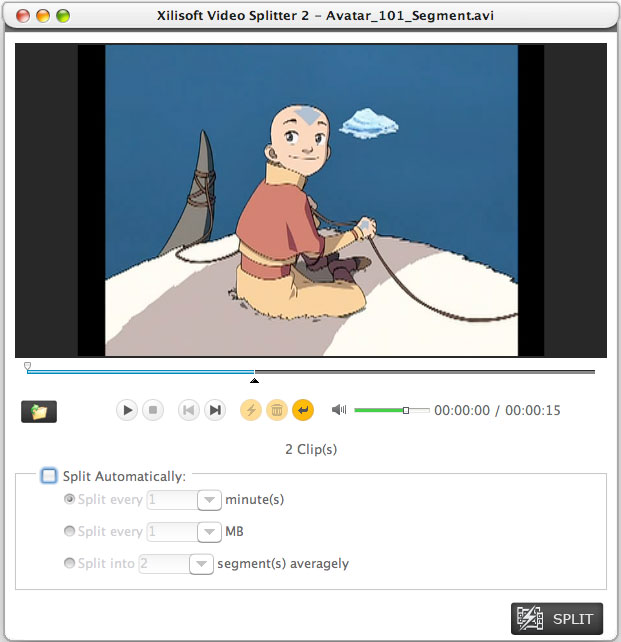
3.Choose the splitting mode
You can split video file in manual or auto mode. There're three auto video splitting options for you to select at will: limit each segment to given seconds and size, and averagely split the video file.4.Split the videos
The last step you should do is just clicking on the "SPLIT" botton and wait for a few minutes to finish the task.Tips:
☆ Previewing the source and edited video file in order to split the video accurately and check the final effect.
☆ With Xilisoft Video Splitter, you can split the video file to get several segments by setting exact time.
☆ You'll get much higher multithreading, which can save your time and trouble greatly.
More Info:Video Splitter 2 for Mac
Add New Comment
Knowledge Base
- Convert VOB to WMV
- Convert YouTube to iPhone ringtone
- Convert FLV to 3GP
- Convert AVI to MP4
- Transfer files from PC to iPhone
- Transfer video from iPod to computer
- Convert SWF to MP4
- Convert MPEG to MP3
- Convert video to GIF image files
- Convert MP3 to M4R iPhone ringtone
- Convert WMV to FLV
- Burn AVI to DVD
- Record your Voice and make your Songs
- Convert RMVB to MP4
- Copy songs from iPod to Mac computer
- Convert AIFF to MP3
- Burn WMV to DVD
- Convert FLV to iPhone
- Manage iPhone without iTunes
- Convert MOV to AVI (DivX), MOV to MPEG
- Convert AVCHD to AVI
- Convert M4V to AVI
- Burn video files to DVD
- Convert FLV to MP4
- Convert HD movie to SD video
- Join video files on Mac
- Extract audio from DVD
- 5 Tips to Make Successful Video Conversion
- Convert M4V to DVD
- Use the M4R converter
- Make free ringtone for iPhone on Mac
- Cut videos/movies on Mac
- Convert YouTube to MOV
- Convert MKV to AVI, MKV to MPEG
- Put videos to iPod
- Convert MP4 to FLV
- Rip blu ray to MP4
- Convert FLV to MOV
- Convert WAV to MP3
- Convert RM to WMV
- Convert MOV to MP3
- Convert MOV to WMV
- Convert DVD to MP3
- Transfer iPhone music
- Convert XviD to AVI
- Convert MP4 to AVI on Mac
- Convert MKV to 3GP
- Convert HD video to Apple TV
- Convert WMV to AVI
- Convert RMVB to AVI
- Rip DVD movie to MP4
- Convert MP4 to SWF
- Save YouTube videos
- Convert MOV to AVI
- Convert YouTube to MP4
- Convert MPEG to MP4 on Mac
- convert FLV to PSP video files
- Split movies on Mac
- Rip Blu-ray disc
- Convert video to DPG
- Convert MP4 to MPEG on Mac
- Download and convert YouTube videos
- Convert FLV to DVD
- Convert RMVB to DVD
- Rip DVD to AVI


